Thing Microservice Workflow
1. Installation
1.1 Prerequisites
Before setting up the Thing Microservice, ensure you have the following dependencies installed:
- Node.js: Version 14.x or later
- npm: Version 6.x or later
- Docker: For containerization and running dependent services like Redis and Loki
- TypeScript: Installed globally for TypeScript compilation
- Git: For version control
1.2 Cloning the Repository
Start by cloning the Thing Microservice repository:
git clone <https://github.com/your-org/thing-microservice.git>
cd thing-microservice
1.3 Installing Dependencies
Install the required Node.js packages:
npm install
1.4 Environment Configuration
Create a .env file in the root directory and configure your environment variables. This file should include settings for database connections, Redis, authentication secrets, and any other service configurations.
Example .env:
DATABASE_URL=
REDIS_URL=
JWT_SECRET=
S3_BUCKET_NAME=
LOKI_URL=
1.5 Running the Service
To run the service in development mode:
npm run start:dev
For production:
npm run build
npm run start:prod
If using Docker, build and run the container:
docker-compose up --build
2. Architecture Overview
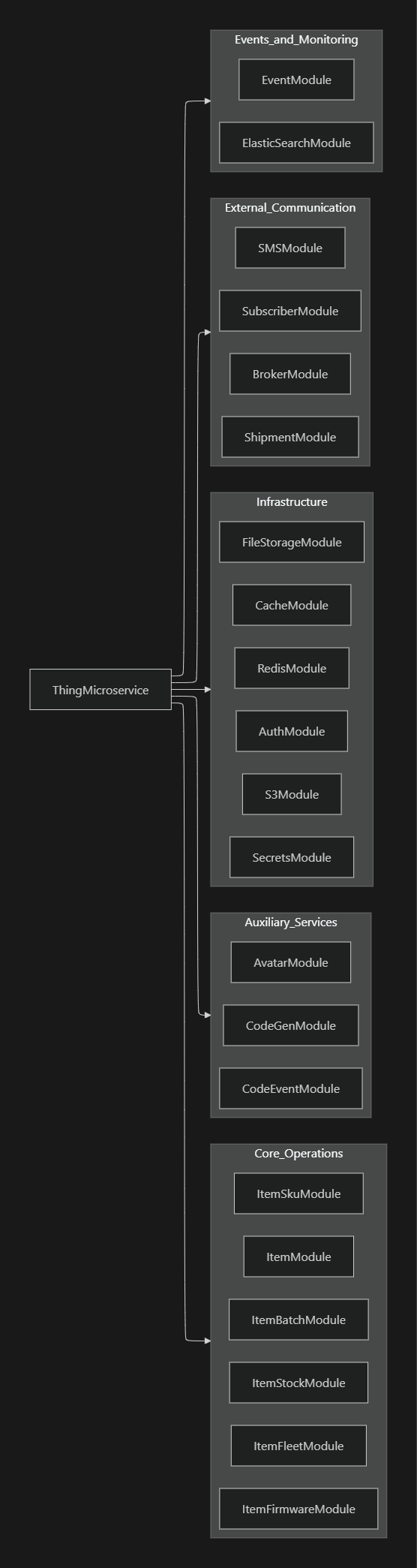
The Thing Microservice is designed using a modular architecture, where each module handles specific business logic, such as items, codes, stocks, and more. The service interacts with various external systems for caching, logging, and file storage.
High-Level Architecture

3. Core Components
3.1 Modules
The Thing Microservice is organized into several modules, each responsible for a distinct part of the system:
- ItemModule: Manages item-related operations, including creation, updates, and retrieval.
- CodeGenModule: Handles code generation for items and other entities.
- CacheModule: Manages caching using Redis.
- AuthModule: Handles authentication and authorization.
- FileStorageModule: Manages file storage operations, interacting with S3.
Module Organization
4. Caching with Redis
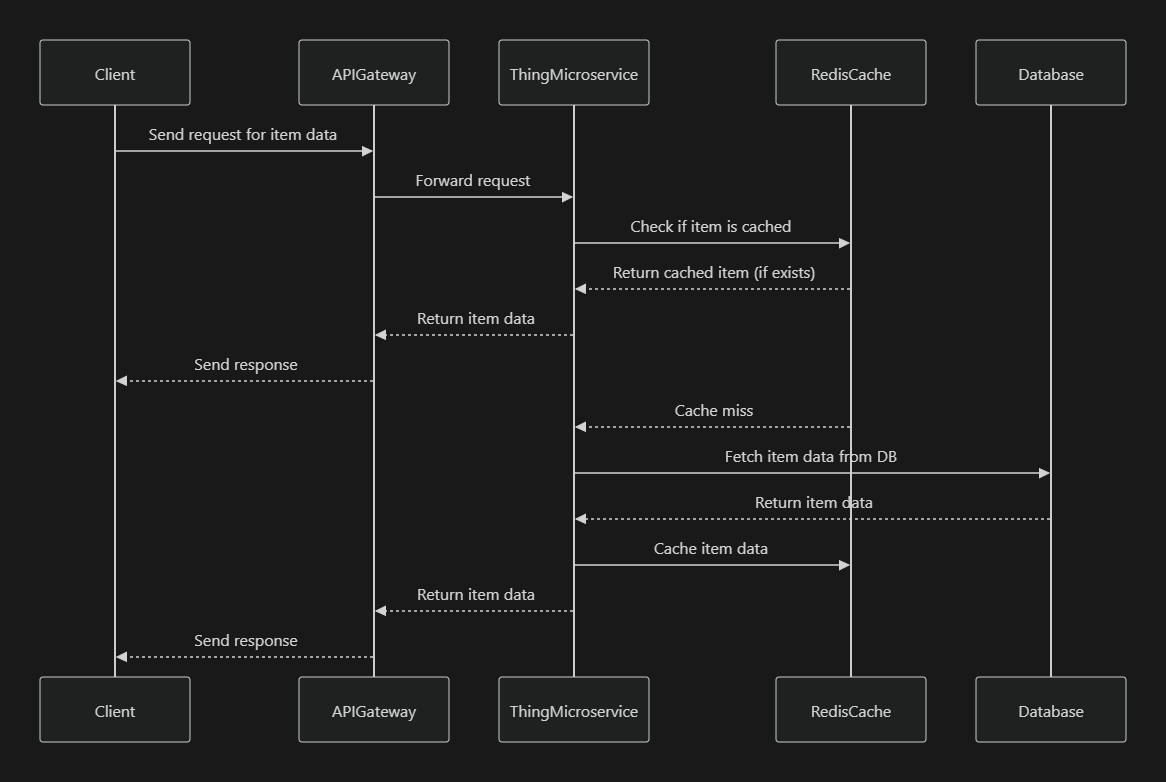
The Thing Microservice uses Redis for caching frequently accessed data to improve performance and reduce database load.
4.1 Redis Integration
Redis is integrated into the service using a dedicated Redis service that interacts with the cache module. Cached data includes frequently accessed item information, stock levels, and other pertinent data.
Redis Service
@Injectable()
export class RedisService {
  constructor(@Inject('REDIS_CLIENT') private readonly client: RedisClient) {}

  async get(key: string): Promise<string> {
    return new Promise((resolve, reject) => {
      this.client.get(key, (err, result) => {
        if (err) return reject(err);
        resolve(result);
      });
    });
  }

  async set(key: string, value: string, ttl: number): Promise<void> {
    this.client.setex(key, ttl, value);
  }
}
Redis Caching Flow
5. File Storage with S3
The Thing Microservice uses AWS S3 for storing files, such as item images, documents, and other related data.
5.1 S3 Integration
The service integrates with S3 through a dedicated S3 service that handles file uploads, retrievals, and deletions.
S3 Service
@Injectable()
export class S3Service {
  private readonly s3 = new S3();

  async uploadFile(file: Express.Multer.File, key: string): Promise<string> {
    const params = {
      Bucket: process.env.S3_BUCKET_NAME,
      Key: key,
      Body: file.buffer,
      ContentType: file.mimetype,
    };

    const data = await this.s3.upload(params).promise();
    return data.Location;
  }

  async deleteFile(key: string): Promise<void> {
    const params = {
      Bucket: process.env.S3_BUCKET_NAME,
      Key: key,
    };

    await this.s3.deleteObject(params).promise();
  }
}
S3 File Storage Flow

6. Authentication and Authorization
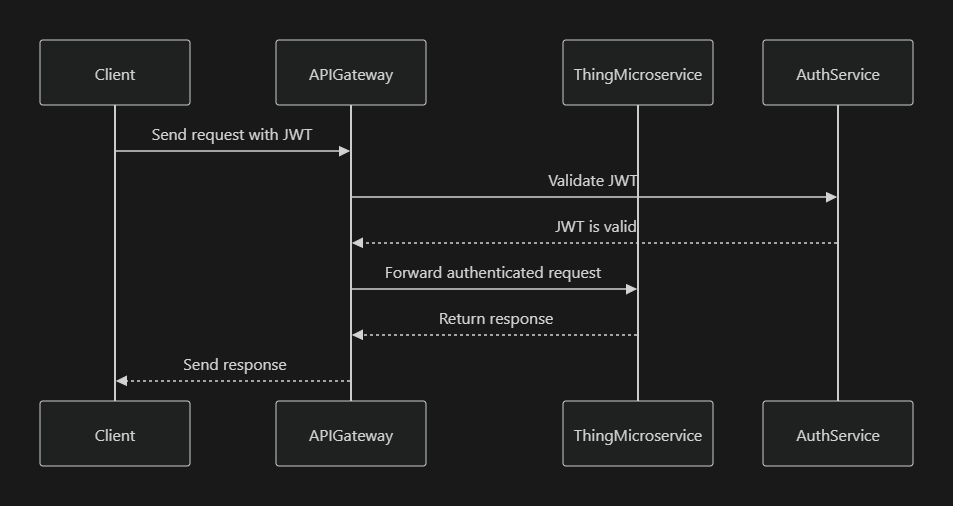
The Thing Microservice uses JWT-based authentication, which is handled by the AuthModule. The JWT tokens are verified for every incoming request to ensure that only authenticated users can access the endpoints.
6.1 JWT Authentication Flow
JWT tokens are generated during user login and passed with each request in the Authorization header. The AuthModule validates the token and grants access to the protected routes.
JWT Auth Guard
@Injectable()
export class JwtAuthGuard extends AuthGuard('jwt') {}

@Injectable()
export class AuthService {
  constructor(
    private readonly jwtService: JwtService,
    @InjectRepository(User) private userRepo: Repository<User>,
  ) {}

  async validateUser(token: string): Promise<User> {
    const decoded = this.jwtService.verify(token);
    return await this.userRepo.findOne(decoded.id);
  }
}
JWT Authentication Flow
7. Logging with Loki
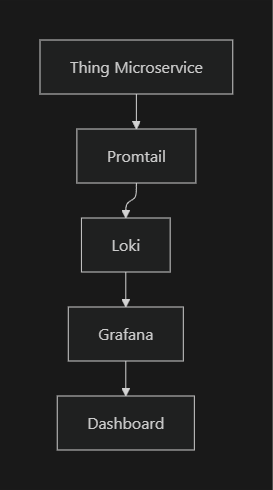
Logging is a critical aspect of monitoring and debugging the Thing Microservice. Loki, combined with Promtail, is used to aggregate and store logs centrally.
7.1 Loki and Promtail Integration
Logs generated by the Thing Microservice are collected by Promtail and pushed to Loki, where they can be queried and analyzed.
Logging Flow with Loki
Logging Example
import { Logger } from '@nestjs/common';

@Injectable()
export class ItemService {
  private readonly logger = new Logger(ItemService.name);

  async createItem(createItemDto: CreateItemDto): Promise<Item> {
    this.logger.log('Creating a new item...');
    // Item creation logic here
    this.logger.log('Item created successfully');
    return item;
  }
}
8. Monitoring and Metrics
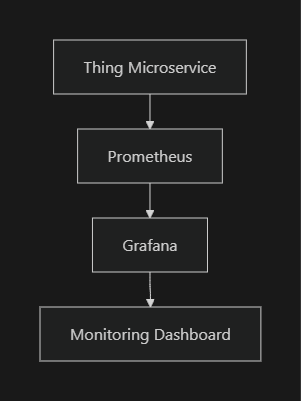
The Thing Microservice uses Prometheus for monitoring and Grafana for visualizing the metrics. Key metrics include request duration, error rates, and resource utilization.
8.1 Prometheus Integration
Metrics are exposed through a /metrics endpoint, which is scraped by Prometheus.
Monitoring Flow
Exposing Metrics
import { Controller, Get } from '@nestjs/common';
import { PrometheusService } from '@willsoto/nestjs-prometheus';

@Controller('metrics')
export class MetricsController {
  constructor(private readonly promService: PrometheusService) {}

  @Get()
  async getMetrics() {
    return this.promService.metrics();
  }
}
9.ElasticSearch Integration
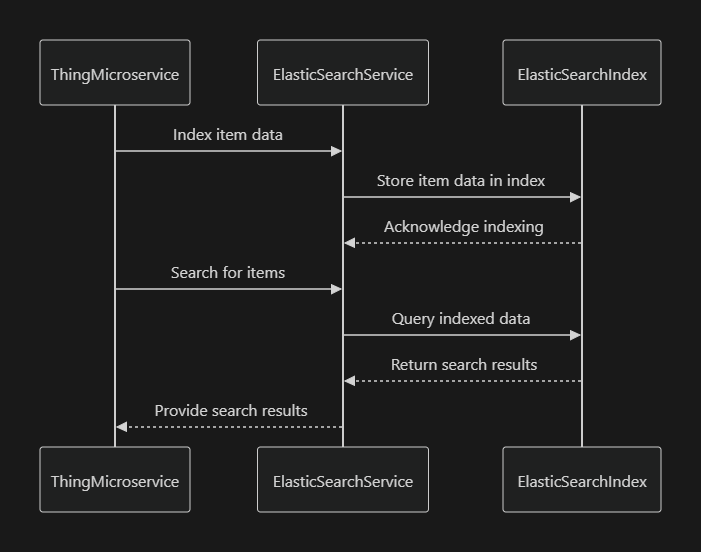
ElasticSearch is used in the Thing Microservice for advanced search functionality. It allows the microservice to efficiently index and search large volumes of data, which is crucial for applications that require robust search capabilities.
Example Use Case:
Suppose you need to search for items based on a variety of criteria like name, SKU, description, and category. ElasticSearch can be integrated to index these items and provide fast search results.
ElasticSearch Service
@Injectable()
export class ElasticSearchService {
  constructor(@Inject('ELASTICSEARCH_CLIENT') private readonly client: Client) {}

  async indexItem(item: Item): Promise<void> {
    await this.client.index({
      index: 'items',
      body: {
        id: item.id,
        name: item.name,
        sku: item.sku,
        description: item.description,
        category: item.category,
      },
    });
  }

  async searchItems(query: string): Promise<Item[]> {
    const { body } = await this.client.search({
      index: 'items',
      body: {
        query: {
          multi_match: {
            query,
            fields: ['name', 'sku', 'description', 'category'],
          },
        },
      },
    });
    return body.hits.hits.map(hit => hit._source);
  }
}
ElasticSearch Integration
10. PayToCode Service
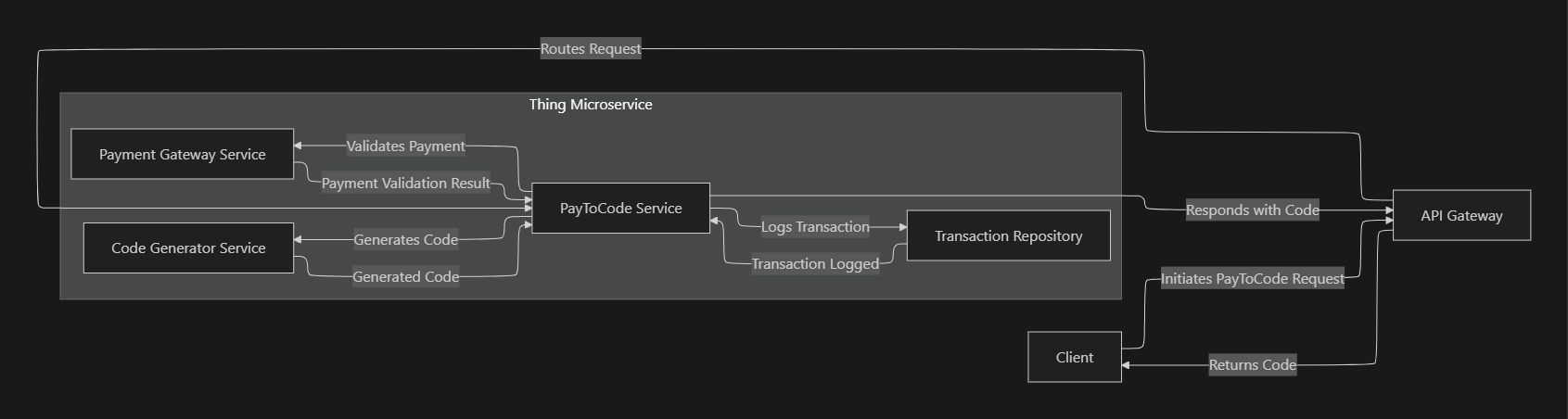
The PayToCode service within the Thing Microservice handles the process where a payment triggers the generation of a specific code, such as a voucher, activation code, or license key. This service ensures the payment is validated before issuing a code and logs the transaction details for future reference.
High-Level Architecture and Data Flow
Detailed Flow:
- Client: The user initiates a request for a code by making a payment, and starting the flow.
- API Gateway: The request first hits the API Gateway, which routes it to the appropriate microservice (in this case, the Thing Microservice).
- Thing Microservice:
- PayToCode Service: This is the central component responsible for orchestrating the PayToCode operation. It interacts with three key services within the microservice:
- Payment Gateway Service: Responsible for validating the payment details with an external payment gateway.
- Code Generator Service: Once the payment is validated, this service generates the requested code.
- Transaction Repository: Logs the transaction details, including the payment and generated code, into a database.
- PayToCode Service: This is the central component responsible for orchestrating the PayToCode operation. It interacts with three key services within the microservice:
- Flow Details:
- The PayToCode Service sends the payment details to the Payment Gateway Service for validation.
- Upon successful validation, the Code Generator Service generates the requested code.
- The transaction details are logged in the Transaction Repository.
- The generated code is returned to the client via the API Gateway.
1. PayToCode Service Implementation
This code snippet demonstrates how the PayToCode service is implemented within the Thing Microservice.
@Injectable()
export class PayToCodeService {
  constructor(
    private readonly paymentGatewayService: PaymentGatewayService,
    private readonly codeGeneratorService: CodeGeneratorService,
    private readonly transactionRepository: TransactionRepository,
  ) {}

  async processPayToCodeRequest(dto: PayToCodeRequestDto): Promise<CodeResponseDto> {
    // Step 1: Validate Payment
    const isPaymentValid = await this.paymentGatewayService.validatePayment(dto.paymentDetails);

    if (!isPaymentValid) {
      throw new Error('Payment validation failed');
    }

    // Step 2: Generate Code
    const generatedCode = await this.codeGeneratorService.generateCode(dto.requestDetails);

    // Step 3: Log Transaction
    await this.transactionRepository.logTransaction({
      ...dto,
      code: generatedCode,
      timestamp: new Date(),
    });

    // Step 4: Return the Generated Code
    return { code: generatedCode };
  }
}
2. Payment Gateway Service Interaction
This snippet shows how the service interacts with an external payment gateway.
@Injectable()
export class PaymentGatewayService {
  async validatePayment(paymentDetails: PaymentDetailsDto): Promise<boolean> {
    // Logic to interact with a payment gateway API
    const response = await axios.post('<https://payment-gateway/validate>', paymentDetails);

    return response.data.isValid;
  }
}
3. Code Generation
Here’s how the service handles the code generation process:
@Injectable()
export class CodeGeneratorService {
  async generateCode(details: RequestDetailsDto): Promise<string> {
    // Logic to generate or retrieve a unique code
    const code = await this.externalCodeService.getNewCode(details);
    return code;
  }
}
4. Transaction Logging
This snippet shows how the transaction is logged into a database:
@Injectable()
export class TransactionRepository {
  async logTransaction(transactionData: TransactionDataDto): Promise<void> {
    // Logic to log the transaction in the database
    await this.transactionModel.create(transactionData);
  }
}
The PayToCode service within the Thing Microservice is a comprehensive system designed to handle payment validation, code generation, and transaction logging.
11. Conclusion
The Thing Microservice is a robust, modular system designed to manage items, codes, stocks, and related entities within a microservices architecture. It integrates with various external systems for caching, logging, file storage, and monitoring, ensuring high performance, security, and reliability.
Purpose of Thing Service
The Thing microservice in our company is designed to manage and handle physical devices, referred to as "Things," and their corresponding online representations, known as "Avatars." It is a crucial component for tracking, managing, and maintaining information related to these physical items and their digital twins.
Key Components
Objects in the Thing Service/Core Functionalities
- SKU (Stock-Keeping Unit):
- Acts as a unique identifier for each product in inventory.
- Essential for tracking and inventory management.
- Category:
- Groups products into categories, facilitating easier management and retrieval.
- The many-to-many relationship with SKU indicates that products can belong to multiple categories and vice versa.
-
Batch: Identifies the production batch of an item, which is essential for tracking and quality control.
-
Firmware:
-
Indicates the firmware version associated with an item, crucial for managing software updates and compatibility issues.
-
Item:
- Represents an individual physical item. Each item is associated with one (SKU, one batch, and one firmware version),
- but it can belong to multiple categories meaning it has the ability to link to multiple categories adds versatility to how items are classified and managed.
- CodeGen:
- A companion object that seems to provide additional, unique information for an item.
- This could be used for unique identification, security features, or other specialized data.
- Avatar:
- This is a digital representation or online twin of the physical item. Essential for digital asset management, IoT applications, or online tracking of physical products.
Product Lifecycle
Provisioning
The provisioning of the ‘thing’ product begins by preparing the data for its digital twin. This information will be essential to keep track of the status of the physical product after it has been manufactured and initialized.
Manufacturing
This is the stage where the product is manufactured according to the specifications of the digital twin.
Installation
At this stage after manufacturing the product, it will be installed for the customer. There are some initial synching of the product which is done with the digital twin via the api. A public-private key combination is generated to establish a secure communication through the API.
Payment Authorization
This is the business end of the product lifecycle which involves setting a payment plan scheme which will authorize the use of the thing product for a specified number of days. The days are tracked and after they elapse, the device is locked to prompt for payment and only unlocked after payment for a specified number of days is done.
Fleet in IoT:
A fleet refers to the entire collection of connected IoT devices that are managed and monitored centrally. These could be sensors, cameras, smart appliances, vehicles, or any IoT-enabled products. Fleet management involves overseeing this group as a whole for deployment, updates, maintenance, monitoring, and analytics.
- Example: A fleet of smart meters deployed across a city for energy monitoring. These smart meters regularly send data back to the central system, where they're monitored, updated, and controlled.
Batch in IoT:
A batch typically refers to a subset of the fleet or a group of devices that are being processed or acted upon simultaneously. This could involve deploying software updates, running diagnostics, or collecting data. In contrast to the fleet (which refers to the whole), a batch refers to a specific group of devices within the fleet that is being worked on at a given time.
- Example: In a fleet of 10,000 smart meters, a batch might consist of 500 devices that are receiving a firmware update during a specific maintenance window.
Relationship Between a Fleet and a Batch in IoT:
- Fleet: The entire set of IoT devices under management.
- Batch: A smaller, operational subset of devices from the fleet that is targeted for a specific task, such as an update, data retrieval, or diagnostics, usually processed at the same time.
Examples in IoT:
- Smart Lighting Systems:
- Fleet: A city’s entire collection of 10,000 IoT-connected streetlights.
- Batch: A group of 200 streetlights in a specific neighborhood receiving a software update during a scheduled maintenance window.
- Autonomous Vehicle Fleet:
- Fleet: A fleet of 500 autonomous delivery vehicles.
- Batch: A batch of 50 vehicles being recalibrated with new sensor configurations or receiving navigation updates at a particular time.
- Industrial IoT (IIoT) Sensors:
- Fleet: An industrial company's entire fleet of 1,000 IoT sensors monitoring factory equipment.
- Batch: A batch of 100 sensors on the assembly line that need a firmware patch to fix a security vulnerability, handled in one operation.
- Connected Health Devices:
- Fleet: A health-tech company's fleet of 5,000 connected wearables that monitor patient vitals.
- Batch: A batch of 300 wearables undergoing performance tests and calibration based on patient feedback.
- Smart Agriculture Sensors:
- Fleet: A fleet of soil moisture sensors across various farms.
- Batch: A batch of 1,000 sensors located on a specific farm that need to be recalibrated based on recent software changes.
Key Differences:
- Scale: Fleet refers to all devices, while a batch refers to a subset.
- Purpose: A batch is used for specific operations, like updating or gathering data from a targeted group of devices in the fleet.
- Operations: You can perform actions on a fleet as a whole, but often, operations like updates or diagnostics are carried out in batches for easier management, reduced risk, and optimized resource use.
In summary, a fleet is the entire group of IoT devices, while a batch is a subset of that fleet that you act upon in a specific instance—for example, when pushing updates, running diagnostics, or retrieving data.
Digital Avatar
The thing microservice has an implementation of a digital avatar which is used to monitor and remotely control the physical device.
An avatar refers to a digital representation or virtual counterpart of a physical device or system in the network. This avatar serves as an interface between the real-world IoT device and the digital world, enabling interaction, monitoring, and control.
Here's how it works:
- Representation: The avatar acts as a virtual model of an IoT device, mirroring its physical properties, sensor data, and states in real-time. For example, the avatar of a smart thermostat would reflect its current temperature settings, energy consumption, and operating status.
- Abstraction Layer: It provides an abstraction layer that allows users or other systems to interact with the IoT device without needing to know the technical details of the hardware. Through this digital interface, commands, data collection, and responses can be managed efficiently.
- Remote Control and Monitoring: With an avatar in place, users can monitor and control their IoT devices remotely via dashboards or other interfaces. The avatar receives updates from the physical device and also sends instructions to the device when changes are made.
- Data Collection and Analytics: Avatars collect and store historical data from their physical counterparts. This data can be used for analytics, predictions, or optimization of the system. For example, an avatar of a machine in a factory might track its operational metrics, allowing for predictive maintenance.
- Interoperability: Avatars facilitate communication between heterogeneous IoT systems by standardizing the interactions between different devices. They can convert raw sensor data into meaningful insights that can be shared across platforms.
In summary, in IoT, an avatar serves as a virtual proxy of the physical device, helping to manage, monitor, and interact with it in a scalable and efficient way.
Class Design and Intent
Services Provided
- Basic CRUD Operations: The Thing Service allows for the creation, reading, updating, and deletion of data related to each of the components mentioned above. This functionality is crucial for maintaining an accurate and current database of physical items and their associated information.
How It Works
- Managing Physical Items and Avatars:
- The service provides a comprehensive system for tracking and managing both physical items (Things) and their digital representations (Avatars).
- It ensures that all relevant data, such as SKU, category, batch, and firmware, are accurately linked to each item.
- Tracking and Updating Information:
- As items go through different stages (e.g., production, software updates), the service updates their information accordingly, maintaining a consistent and up-to-date record.
- Interconnection with Other Services:
- The Thing Service may interact with other microservices (like inventory management, sales, etc.) to provide a holistic view of each item's lifecycle and usage.
Class Design and Service Operations
- The service is structured to provide basic CRUD (Create, Read, Update, Delete) operations, forming the backbone for managing the data associated with these objects.
- CRUD operations ensure that users can add new items, retrieve and view existing item details, update item information as needed, and remove items from the system when they are no longer relevant.
BATCH CODE PROCESSING
OVERVIEW
The purpose of this documentation is to describe the processes that are involved in generation of codes for each IOT device beginning from item creation all the way to generating daycodes. These processes are performed in the Thing Make Microservice
PROCESS DIAGRAM
Batch processing is a three-stage process
- Item Creation
- Batch Initialization
- Batch Code Generation
- ITEM CREATION Items are created in batches. The following parameters are specified during this stage
INPUT PARAMETERS
- itemBatchId This is the id of the batch that is created in advance
- totalProducts The total number of items to be created in a batch
- itemFirmwareId This is the id of the firmware that was created in advance
- itemFleetId This is the id of the fleet that is created in advance
- oemItemId This is a unique string that can be used to identify an item
ENTITIES
Item Entity
The item entity that is created contains the following parameters
- oemID: string - also known as the object equipment manufacturer. This is an ID that identifies the manufacturer of the product
-
oemItemID: string - This is concatenates the oemID + YY
-
MM + DD + xxxxxx. The obscured value will contain incremental numbers with a range from 0 - 999999. YY (year in 2 digits - so the last two digits of the year), MM (month in 2 digits).
-
sellerID: string -The sellerID is the same as oemID
- sellerItemID: string - This is the same as oemItemID
- sku: ItemSKU (Many-to-One relationship) - meaning many items can have one itemSKU. Also known as stock keeping unit
- batch: ItemBatch (Many-to-One relationship) - Many items can belong under one batch
- firmware: ItemFirmware (Many-to-One relationship) - Many items can belong under one firmware id
- stock: ItemStock | null (Many-to-One relationship, nullable)
- fleet: ItemFleet | null (Many-to-One relationship, nullable) - Many items can belong in the same fleet
- lifeCycle: LifeCycle (Enum type)
- codeGenerator: CodeGenerator | null (One-to-One relationship, nullable) - each item is only allowed to have one code generator
- openTokenCodeGen: OpenTokenCodeGen | null
(One-to-One relationship, nullable) - each item can have only one openTokenCodeGen and this field is optional
- openTokenCodeDecoder: OpenTokenCodeDecoder | null (One-to-One relationship, nullable) - Each item is only allowed to have a single openTokenCodeDecoder
- codeGenUsed: CodeSystemType | null (Enum type, nullable)
- The codegen used can be either of ACP1, ACP2 or OPENTOKEN
- legacyItemId: number | null (nullable)
- agentId: ObjectId | null (nullable) - This is he id of the agent
- code: string | null (nullable) - this is the actual code that has been generated
OUTPUT PARAMETERS
The output that is generated is supposed to be a list of items ready for download
- Items[] list of items with parameters on the item entity
- BATCH INITIALIZATION - This is the second stage of the batch processing that an item transitions to. After all items in a batch have been created, the items in the same batch will be initialized with code systems.
INPUT PARAMETERS
- itemBatchId - (string) The ID of the batch
- codeGenType (Enum) It is either one of ACP1 | ACP2 | OPENTOKEN
ENTITIES
The entities that are involved in this process is the
- Item entity This has the same parameters as specified earlier
- CodeGenerator Entity
The codegenerator is created during this process and attached to each item
- codeSystem: CodeSystem (Many-to-One relationship) - Many items can belong to one codeSystem
- hashRoot: string - This is a private key in the private-public key pair combination of {hashRoot, hashTop}
- hashTop: string - This is the public key in the private-public key pair combination of {hashroot. hashtop}
- hashTopInitial: string | null
- codeCount: number - Number of times a code can be generated in the lifetime of the item
- hashIndex: number
- codeReversalCount: number
- freeCodeCount: number - This value is decremented each time freeCode is called
- resetCodeCount: number - This value is decremented each time resetCode is called.
- codeHistory: CodeEvent[] (One-to-Many relationship) - This retains the history of the codes that have been generated for each item
- semaphoreLock: boolean | null - This is a boolean that prevents the item from being accessed when a major process is being performed on it
- userWhoCausedTheChange: string | null - This reference the user who caused the change
- typeOfChangeChange: string | null -
- descriptionOfChangeChange: string | null
- codeLimits: { resetCodeCount: number; freeCodeCount: number } | null (JSON type, nullable) - sets the limit of freeCodeCount resetCodeCount to ensure that only a limited number of resetCode and freeCode are generated in the lifetime of the item
- lockFree: boolean | null (private field)
- isLockFree: boolean (method)
- updateLockFree: void (method, takes a boolean parameter)
OUTPUT PARAMETERS
The output generated is a list of items ready for download
- Items[] A list of items ready for download.
- BATCH CODE GENERATION This is the third stage of the batch processing. The following parameters are used in this stage
INPUT PARAMETERS
The following input parameters should be specified during this process
- batchId This is the ID of the batch used to create the items in question
- codeDays This is the number of days each code that will be generated should have for usage. Defaulted to 1
ENTITIES
The following entities are applicable during this stage
- Item Entity
These are the parameters which are updated in this state
- itemId: string (converted from item._id.toString())
- codeDays: number (from batchCodeInput.codeDays)
- description: string (constructed from batchCodeInput.batchId and batchCodeInput.codeDays)
- type: ActorTypes (enum type, specifically ActorTypes.DEVICE)
- actionScope: ActionScope (enum type, specifically ActionScope.DEVELOPMENT)
- actorName: string ('eIOT')
- lifeCycle: LifeCycle (enum type, specifically LifeCycle.INITIATED)
- thingIdType: ThingIDTypes (enum type, specifically ThingIDTypes.UUID)
- batchState: BatchState (enum type, specifically BatchState.Scheduled)
- thingCreationDate: Date (current date via new Date())
- thingDescription: string ('Batch Code')
This is the stage that the token is also generated and the resetCodeCount or free code count are decremented.
OUTPUT PARAMETERS
The output generated is a list of items ready for download
- Items[] - A list of items containing the item entity parameters
STATE TRANSITIONS
Each individual process is marked by some distinct state transition that orchestrates the entire process until the end
- Pending: 'Pending'
- InProgress: 'InProgress'
- Completed: 'Completed'
- Failed: 'Failed'
- Suspended: 'Paused'
At each stage the items begin in a pending state, and in between the process, the database is periodically updated with the count of items already processed at consistent intervals of time.
After the process is completed, the state will be changed to Completed. The count of items processed is what informs the decision whether a state will transition from pending -> in progress -> completed | Failed | Suspended.
RECOVERY STEPS
Typically, in the real world, system processes cannot be assumed to be done to completion. We have to plan for the inevitable interruptions.
The oves systems that make up the “Thing Make” has a progress tracking system attached at the batch level called “actionProgress”.
Let us suppose that a process is ongoing, like Creating a list of items in a batch. Intermediate processes will be running to periodically update the database with a progress count.
A cron job is used to determine if a process is stalled for longer than a predefined period of time. This is to say that if progress count for a job like “Creating an Item” has not been changed for a while, this is an indication that the job has certainly stalled.
In the event of a system crash or termination, we have placed checks in place to listen to the termination signal, SIGINT or SIGTERM. In a stateless environment like kubernetes, before a pod can be terminated, or for an unhealthy pod, the system sends the SIGTERM signal to the unhealthy pod. The microservice running the job listens for these signals and does the final cleanup. That is the final state of the job is saved so that when a new pod is created, it polls the database for a batch state that is paused or suspended.
The job is then resumed from where it stopped
PROCESS SUMMARY
BatchProcess {
:Batch Creation Job;
: ├── Step 1: Create Items in the Database;
: └── Step 2: Link Items to the Specific Batch;
}
BatchInitializationJob {
:Batch Initialization Job;
: ├── Step 1: Fetch Items from the Batch;
: ├── Step 2: Initialize Items;
: ├── Step 3: Track Initialization Progress;
: └── Step 4: Select Code System (ACP1, ACP2, OPENTOKEN);
}
BatchCodeGenerationJob {
:Batch Code Generation Job;
: ├── Step 1: Fetch Initialized Items;
: ├── Step 2: Process Items for Code Generation;
: │ ├── Chunked Processing;
: │ └── Apply Selected Code System (ACP1, ACP2, OPENTOKEN);
: ├── Step 3: Track Code Generation Progress;
: └── Step 4: Complete Batch Code Generation;
}