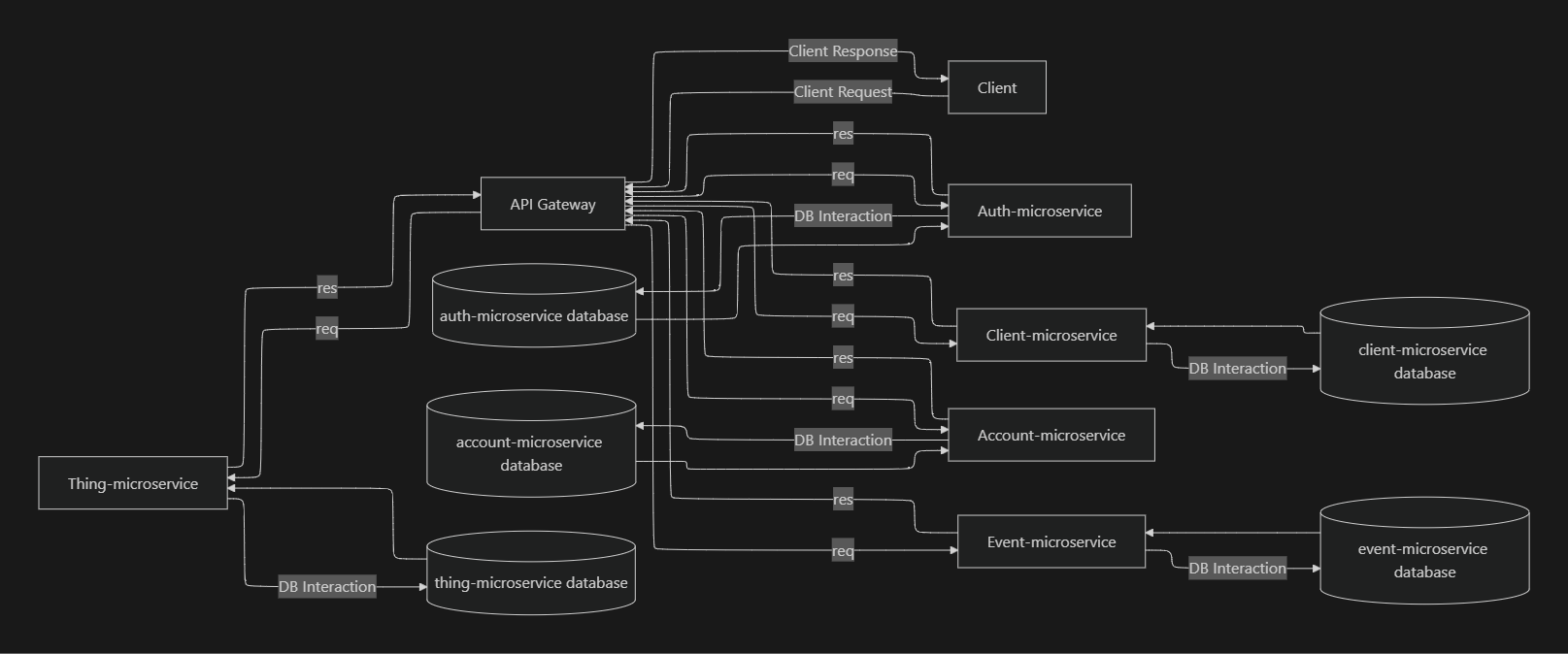
Flow of Data between API Gateway and different microservices
Architecture between API gateway and auth microservice
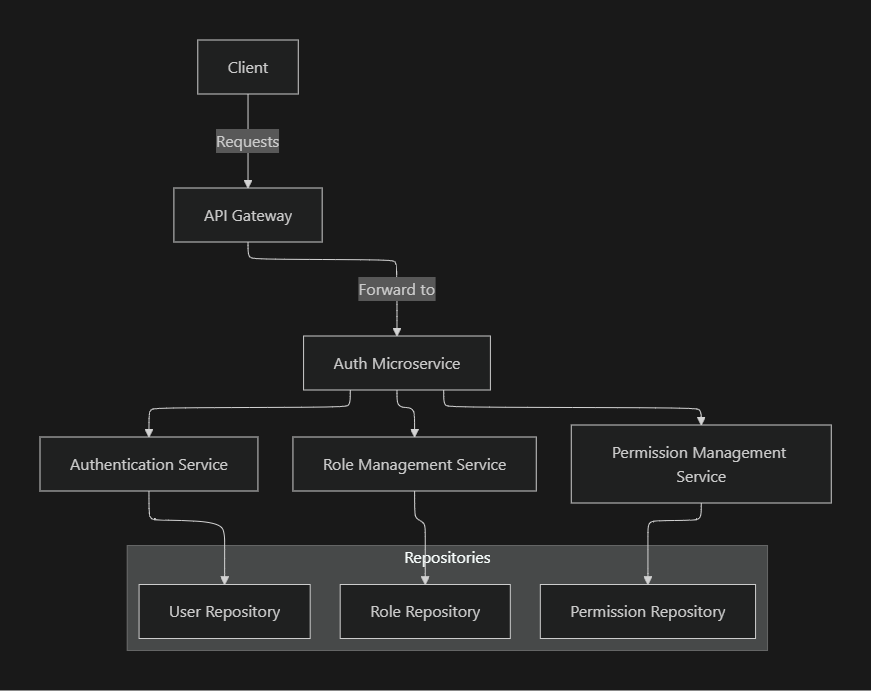
1. Use Cases and Flows
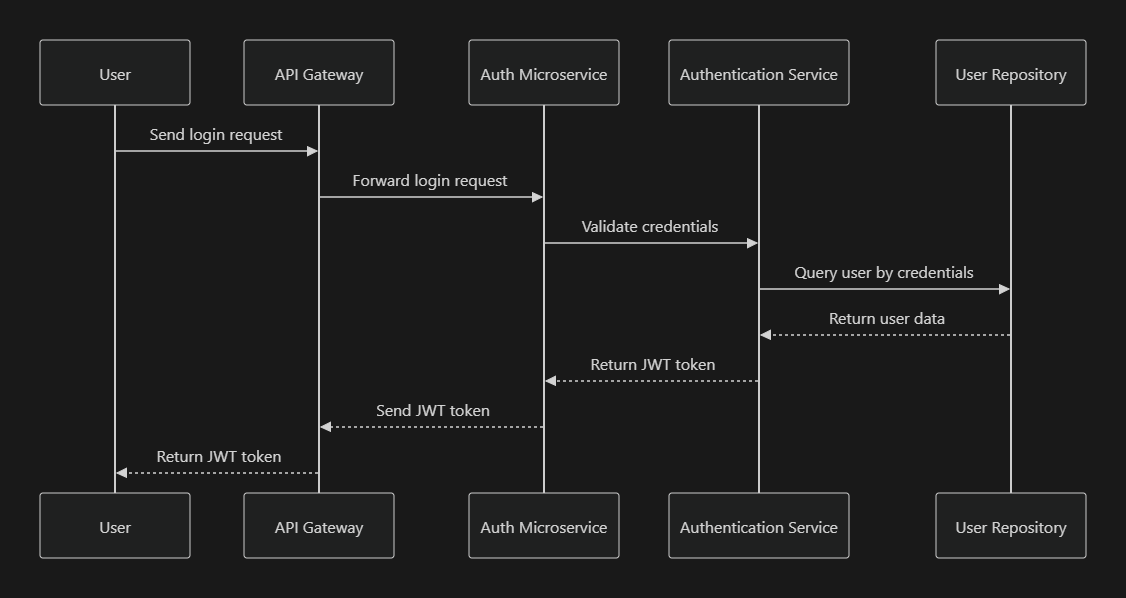
Use Case 1: User Login and Authentication
- Step 1: The user sends a login request to the API Gateway.
- Step 2: The API Gateway forwards the request to the Auth Microservice.
- Step 3: The Auth Microservice uses the
AuthenticationServiceto validate the user's credentials. - Step 4: If valid, the service generates a JWT and returns it to the client via the API Gateway.
User Login Flow
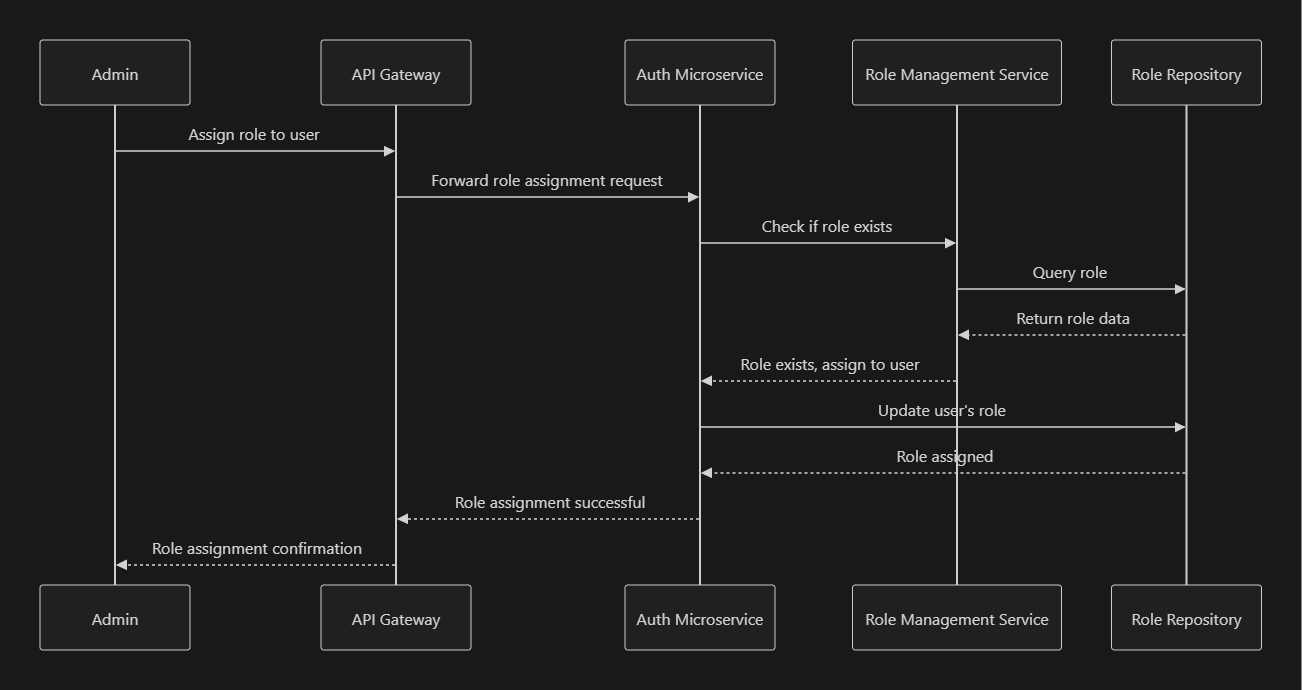
Use Case 2: Role Assignment
- Step 1: An admin sends a request to assign a role to a user via the API Gateway.
- Step 2: The request is forwarded to the Auth Microservice.
- Step 3: The
RoleManagementServicechecks if the role exists using the appropriate decorator. - Step 4: If valid, the service assigns the role to the user and updates the database.
Role Assignment Flow
2. Security Considerations
Authentication and Authorization:
- JWT Authentication: The Auth Microservice uses JWT tokens to authenticate users. These tokens are issued upon successful login and must be included in subsequent requests to access protected resources.
- Role-Based Access Control (RBAC): Permissions are assigned to roles, and roles are assigned to users. This hierarchical structure ensures that only authorized users can access specific resources or perform certain actions.
Validation and Existence Checks:
- Decorators: The system uses custom decorators like
IsRoleAlreadyExistsorIsPermissionNotAlreadyExiststo validate requests. This ensures data integrity by checking the existence of roles, permissions, and other entities before performing any operations.
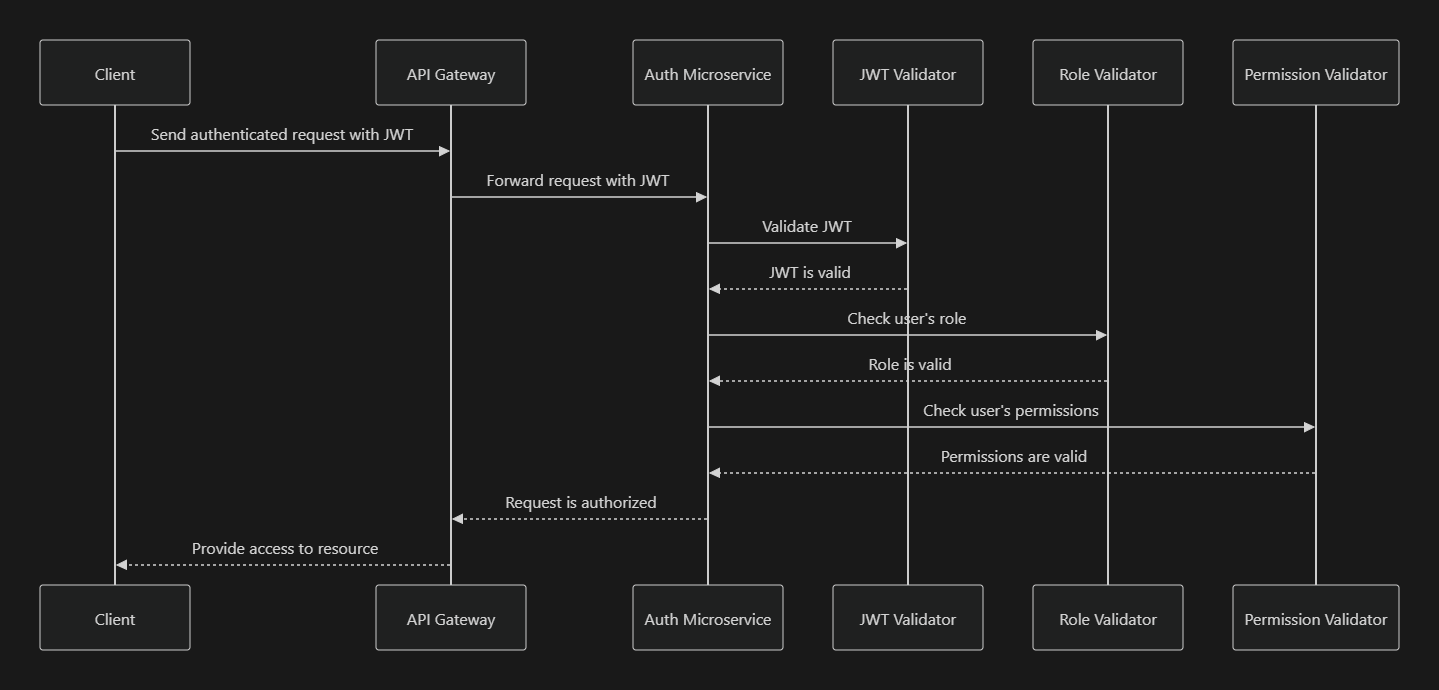
Data Flow from API Gateway to Auth Microservice:
- Request Validation: Before forwarding requests to the Auth Microservice, the API Gateway may perform basic validation, such as ensuring that the request contains the necessary authentication tokens.
- Authorization: Once the request reaches the Auth Microservice, it verifies the JWT token, checks the user’s roles, and ensures that the user has the required permissions to perform the requested action.
Security Flow
3. Data Flow from API Gateway to Auth Microservice
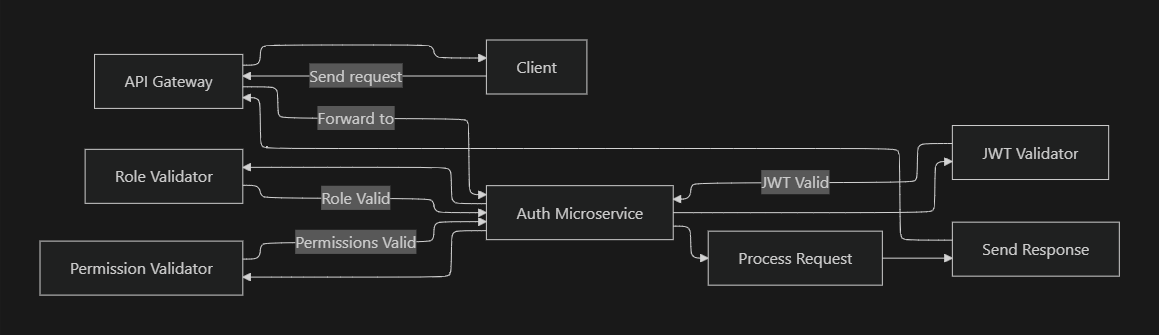
The data flow from the API Gateway to the Auth Microservice involves several key steps:
- Request Reception: The API Gateway receives the request from the client.
- Request Validation: The API Gateway may validate the request headers, ensuring that a JWT token is present.
- Request Forwarding: The validated request is forwarded to the Auth Microservice.
- Authentication and Authorization: The Auth Microservice validates the JWT, checks the user's roles and permissions, and processes the request.
- Response Handling: The Auth Microservice sends the appropriate response back to the API Gateway, which then forwards it to the client.
Data Flow from API Gateway to Auth Microservice

Architecture between API gateway, auth microservice, and account microservice.
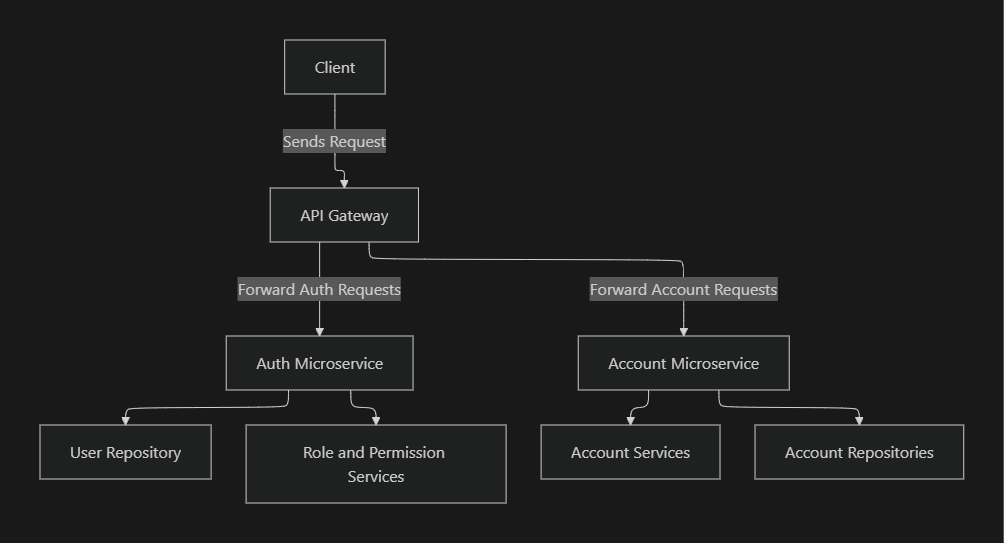
1. Data Flow Between API Gateway, Auth Microservice, and Account Microservice
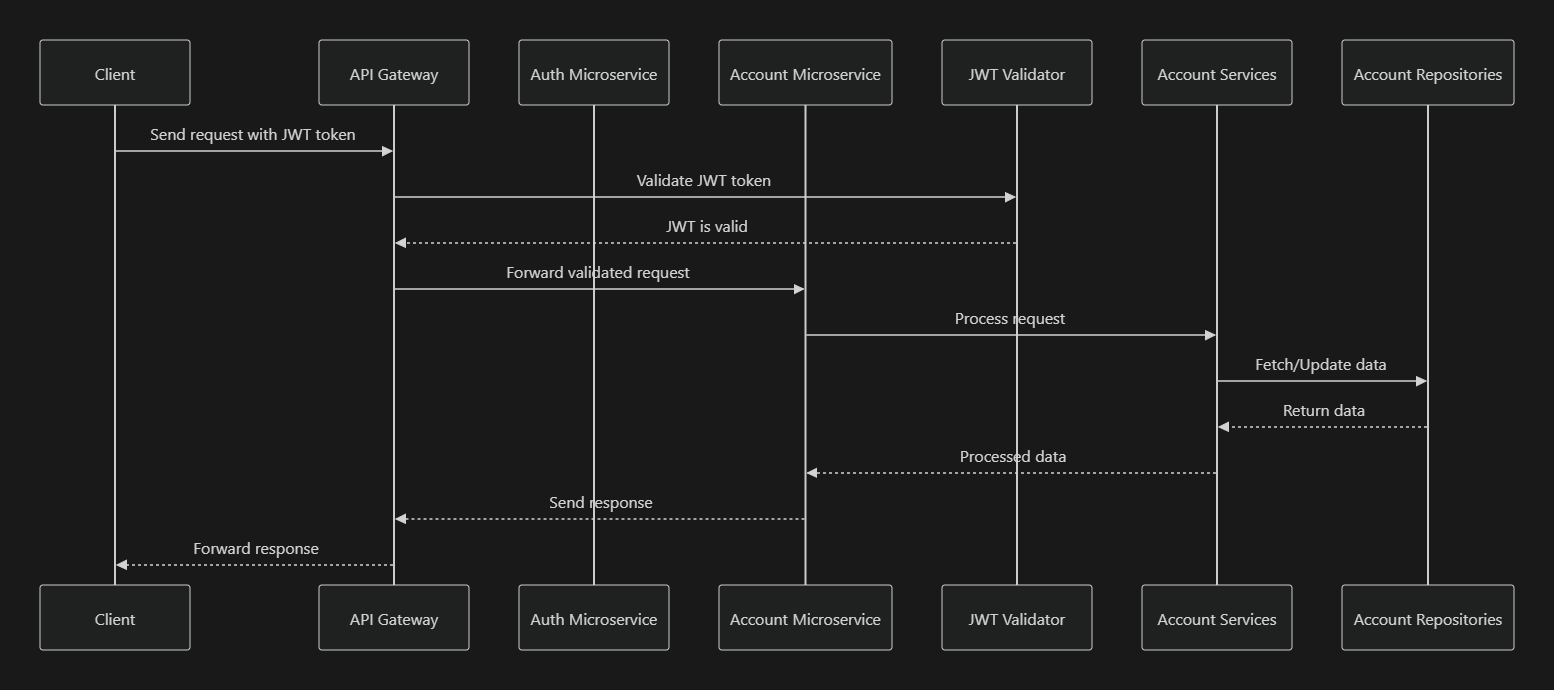
Once authentication is complete, the client can access various services provided by the Account Microservice. Below is a detailed explanation of how data flows between these components.
Data Flow Steps:
- Authenticated Request: The client sends a request to access a resource in the Account Microservice, including the JWT in the Authorization header.
- API Gateway - JWT Validation: The API Gateway intercepts the request and verifies the JWT. If valid, the request is forwarded to the Account Microservice.
- Account Microservice - Request Processing:
- The Account Microservice receives the request and further processes it using the relevant service (e.g., managing asset accounts, retrieving user information, etc.).
- The service might interact with various repositories (e.g., Account Repository, PayPlan Repository) to fetch or update data.
- Response Handling: The Account Microservice sends the response back to the API Gateway, which then forwards it to the client.
Data Flow

2. Detailed Code Flow and Interaction
The following section delves into specific interactions and data exchanges between the components, highlighting the role of services, repositories, and decorators.
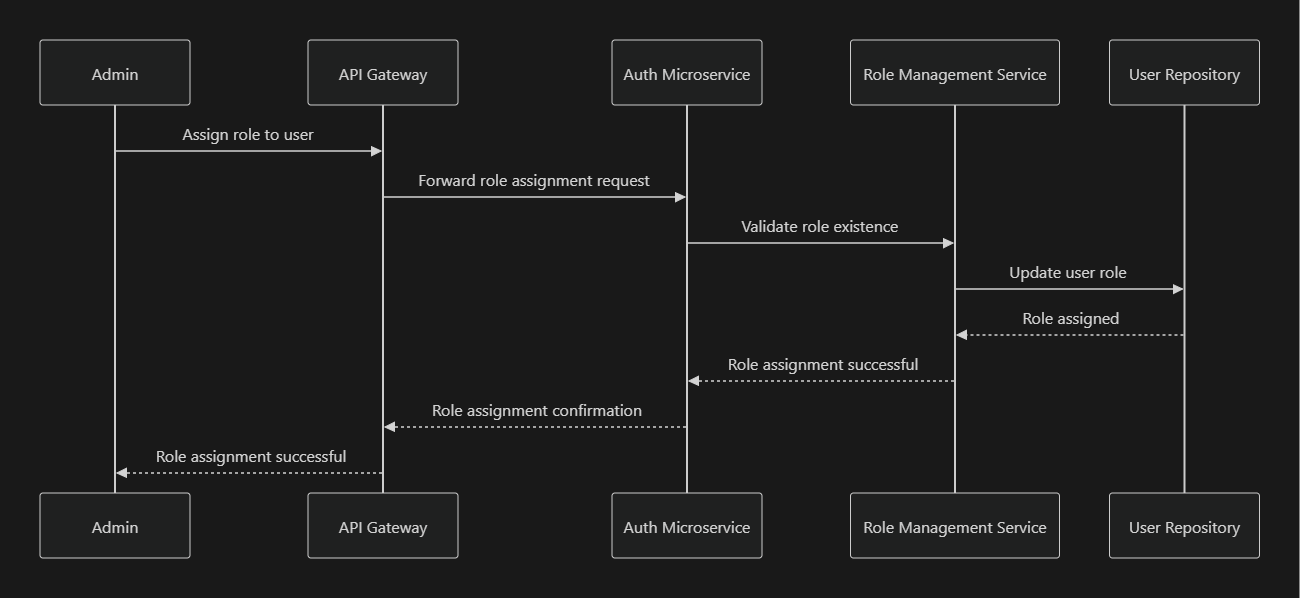
2.1. User Role Assignment
When an admin assigns a role to a user, the following interactions take place:
- API Gateway: Receives the role assignment request and forwards it to the Auth Microservice.
- Auth Microservice:
- Uses
RoleManagementServiceto check if the role exists. - Updates the user's role in the User Repository.
- Sends a confirmation response back to the API Gateway.
- Uses
Role Assignment Flow
2.2. Asset Account Management
When a client requests to view or manage asset accounts, the flow is as follows:
- API Gateway: Validates the JWT and forwards the request to the Account Microservice.
- Account Microservice:
AssetAccountServicehandles the request, interacting with the relevant repositories.- Data is retrieved or updated in the AssetAccount Repository.
- The response is sent back through the API Gateway to the client.
Asset Account Management

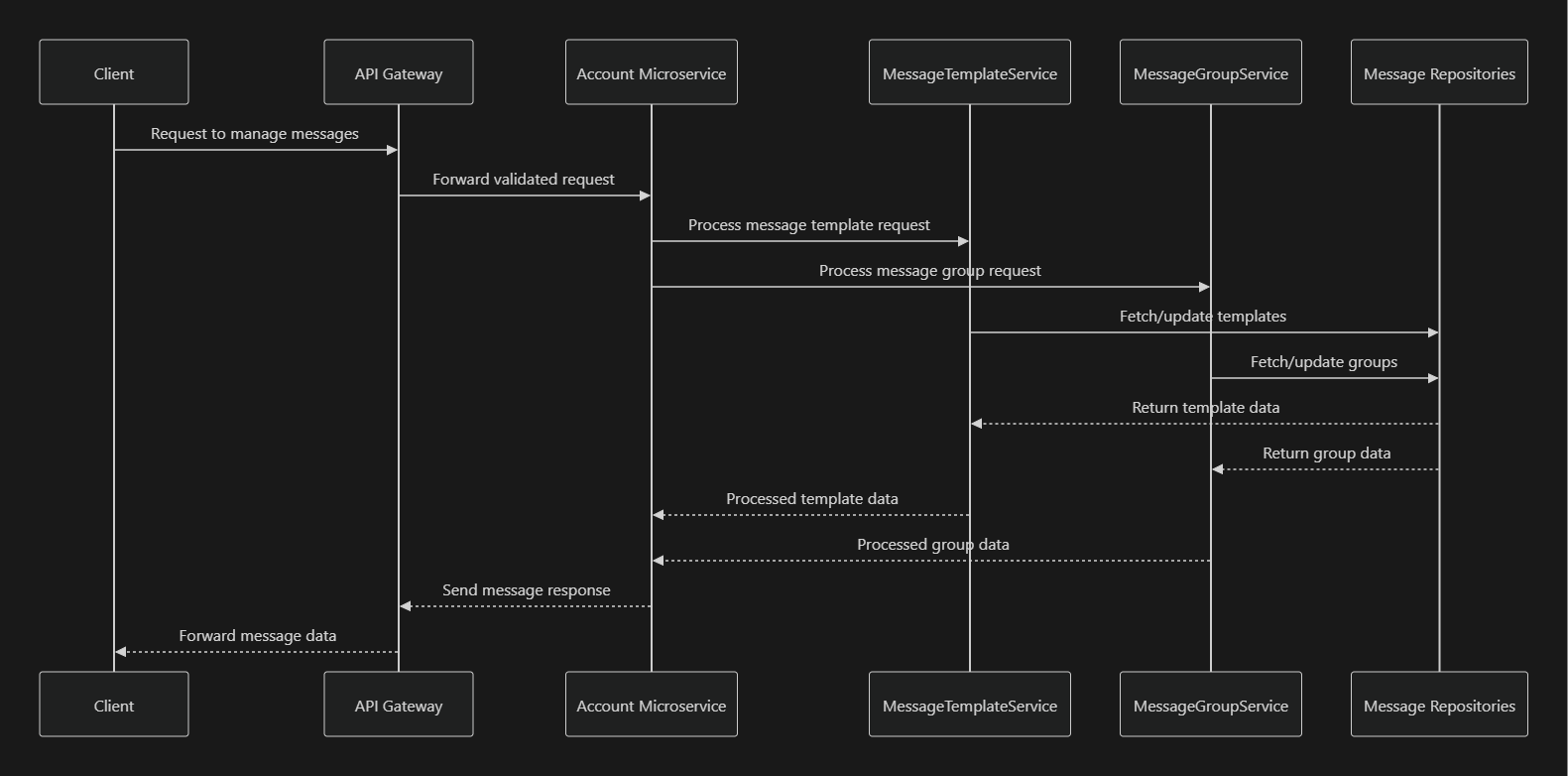
2.3. Message Handling in Account Microservice
Messages are handled in the following way when a client interacts with messaging functionalities:
- API Gateway: Receives the request and forwards it to the Account Microservice.
- Account Microservice:
- Uses
MessageTemplateServiceorMessageGroupServiceto process the message request. - Interacts with the corresponding repositories to fetch or update messaging data.
- Returns the processed data to the client via the API Gateway.
- Uses
Message Handling
3. Scenario: Unauthorized Access Attempt
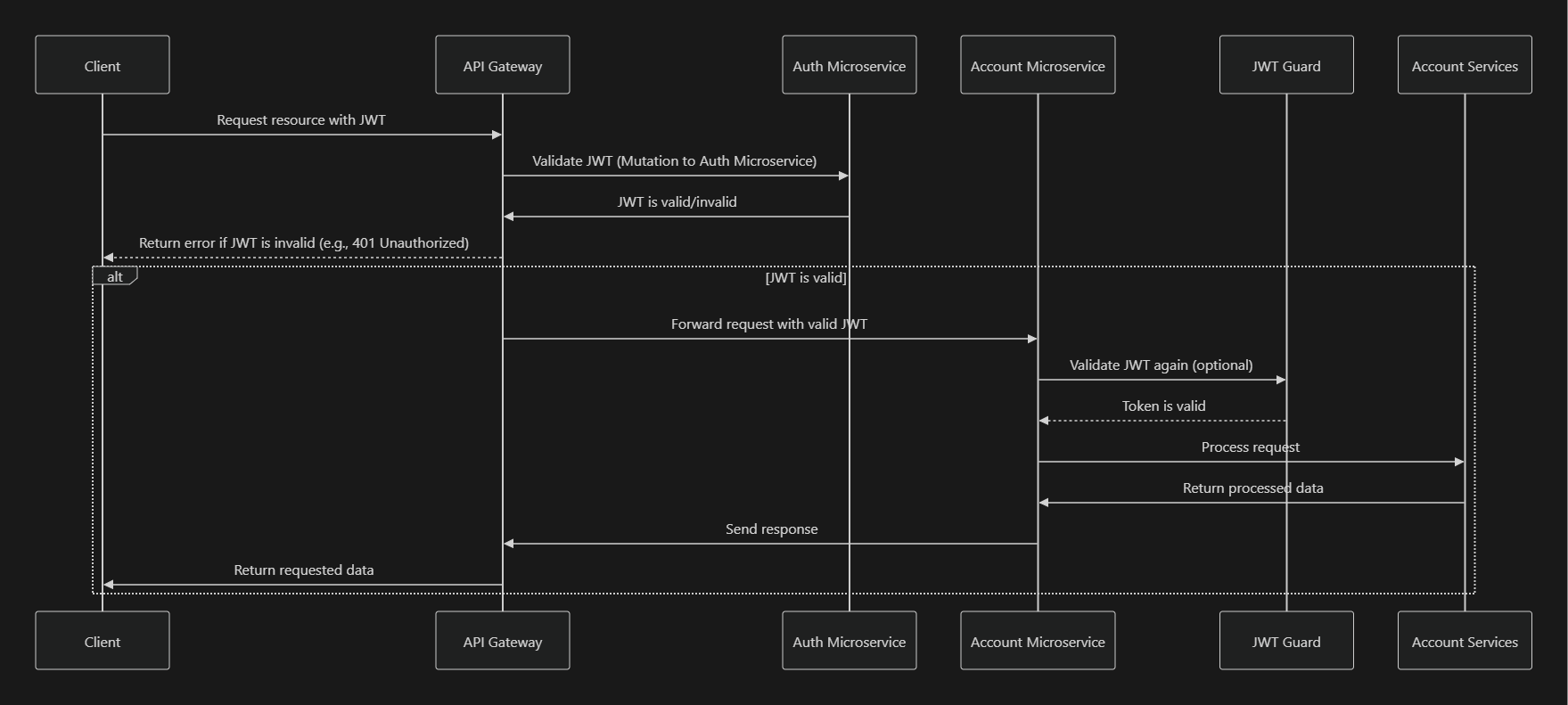
- User Attempt: A user attempts to directly access the Account Microservice without going through the API Gateway.
- API Gateway Role: Normally, the API Gateway would forward requests to the Auth Microservice for authentication before allowing access to other microservices like the Account Microservice.
- Direct Access Handling in Account Microservice:
- Missing or Invalid JWT: If the request does not have a valid JWT token, the Account Microservice’s JWT guard (
jwt-auth.guard.ts) will reject it. - Additional Security: The Account Microservice should not typically handle direct requests; it should be protected by ensuring that only requests coming from the API Gateway are accepted.
- Missing or Invalid JWT: If the request does not have a valid JWT token, the Account Microservice’s JWT guard (
Architecture between API gateway, auth microservice, client microservice, and account microservice.
1. Data Flow Between API Gateway, Auth Microservice, Client Microservice, and Account Microservice
1.2 Request Handling and Data Flow
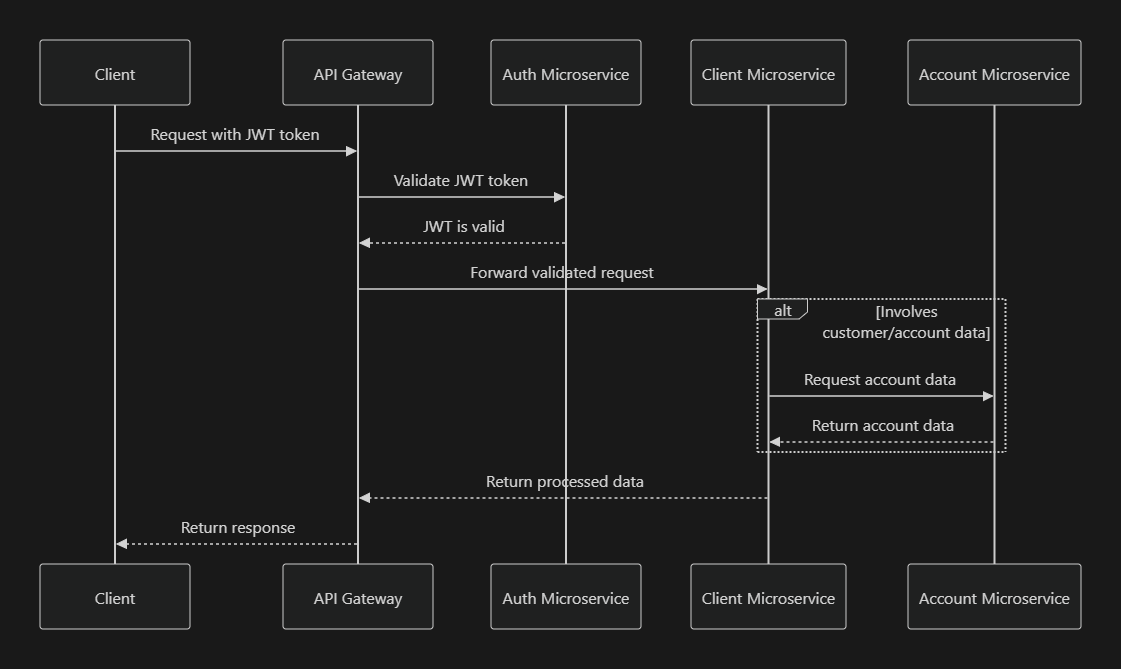
- Authenticated Request: The client sends a request to access a resource in the Client Microservice, including the JWT token.
- API Gateway:
- Validates the JWT token via the Auth Microservice.
- Forwards the request to the Client Microservice.
- Client Microservice:
- Processes the request using its internal services and repositories.
- May interact with the Account Microservice if the request involves customer or account-related data.
- Account Microservice:
- If involved, processes the requested data and returns it to the Client Microservice.
- Response Handling: The processed data is sent back to the API Gateway and then returned to the client.
Data Flow Between Microservices
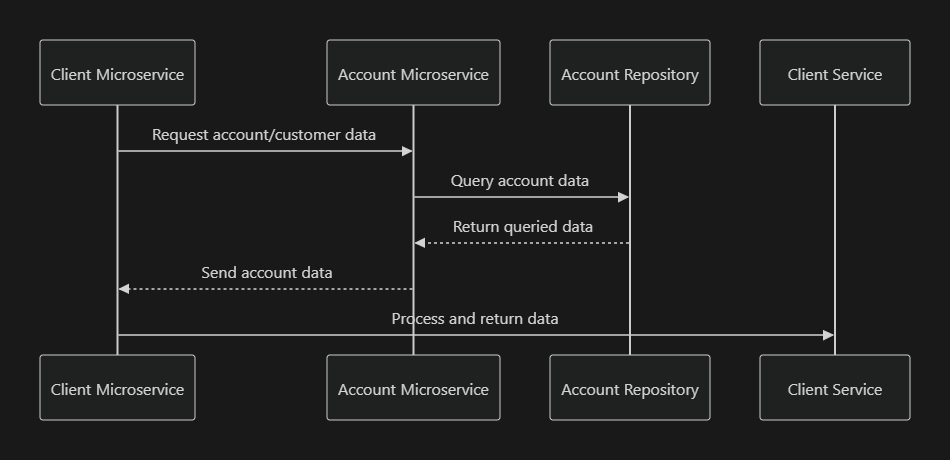
1.3 Specific Data Interactions
- Client and Account Data:
- When managing customer accounts or retrieving account-related data, the Client Microservice may need to interact with the Account Microservice.
- This interaction is facilitated through service calls within the Client Microservice that fetch necessary data from the Account Microservice, ensuring data consistency and integrity.
Client to Account Microservice Data Interaction
2. Security and Access Control
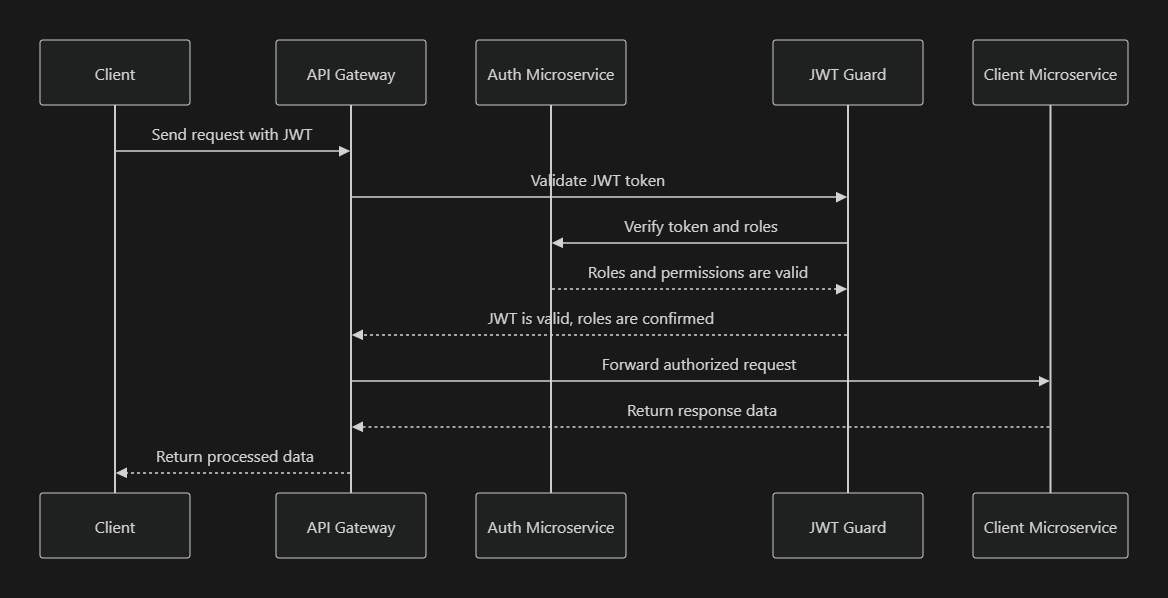
- JWT Validation: All requests are authenticated through the Auth Microservice. The JWT tokens issued by the Auth Microservice are validated by the API Gateway before any requests are processed by the Client or Account Microservices.
- Role-Based Access Control (RBAC): The Auth Microservice manages roles and permissions, ensuring that users can only access resources they are authorized to.
Security and Access Control Flow
3. Conclusion
The Client Microservice interacts seamlessly with the API Gateway, Auth Microservice, and Account Microservice. The API Gateway ensures that all requests are authenticated and authorized through the Auth Microservice before they are routed to the appropriate microservice. The Client Microservice can also interact with the Account Microservice when customer or account-related data is involved, ensuring that the system operates securely and efficiently.
Architecture between API gateway, event microservice, auth microservice, and account microservice.
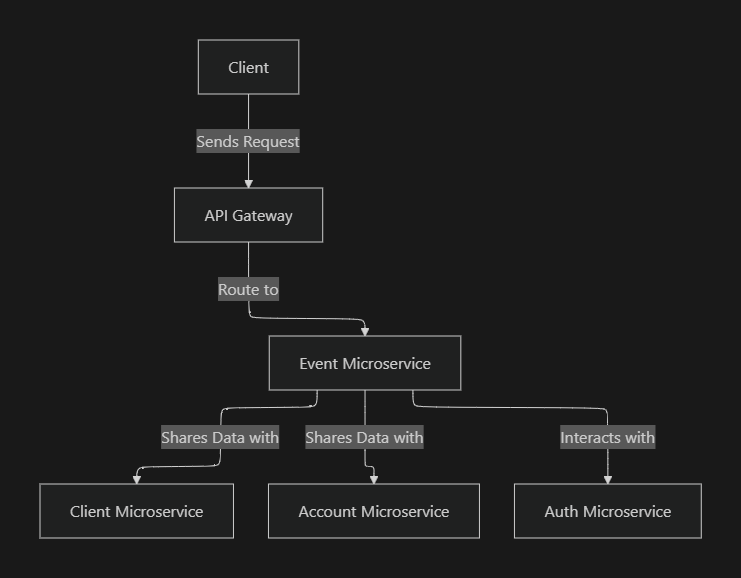
1. Overview of the System Architecture
The system consists of the following key components:
- API Gateway: Serves as the entry point for all client requests, handling routing, authentication, and load balancing.
- Event Microservice: Manages events, signals, brokers, and related data. It processes and distributes event-related data across the system.
- Other Microservices: May include the Client Microservice, Account Microservice, etc., which interact with the Event Microservice for specific data processing tasks.
High-Level Architecture
2. Data Flow Between API Gateway, Event Microservice, and Other Microservices
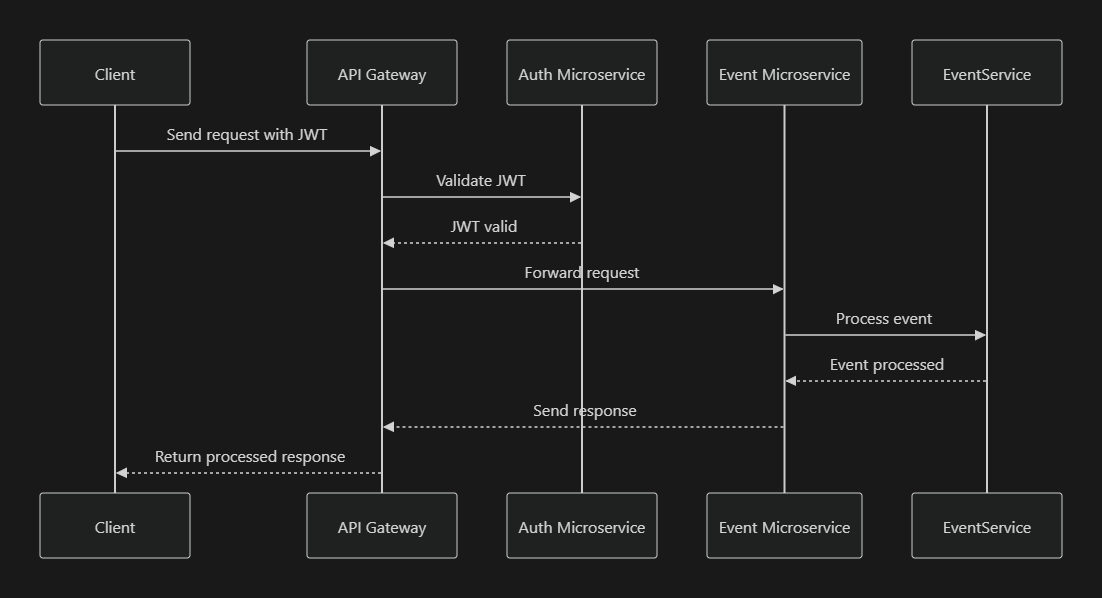
2.1 API Gateway to Event Microservice
- Client Request: A client sends a request (e.g., to log an event) to the API Gateway.
- API Gateway:
- Validates the JWT token via the Auth Microservice.
- Routes the request to the Event Microservice.
- Event Microservice:
- Processes the event data.
- May interact with other microservices (e.g., Client or Account Microservice) to store, update, or retrieve related data.
API Gateway to Event Microservice Flow
2.2 Event Microservice Interaction with Other Microservices
The Event Microservice may need to interact with other microservices like the Client Microservice or Account Microservice to process and manage event-related data.
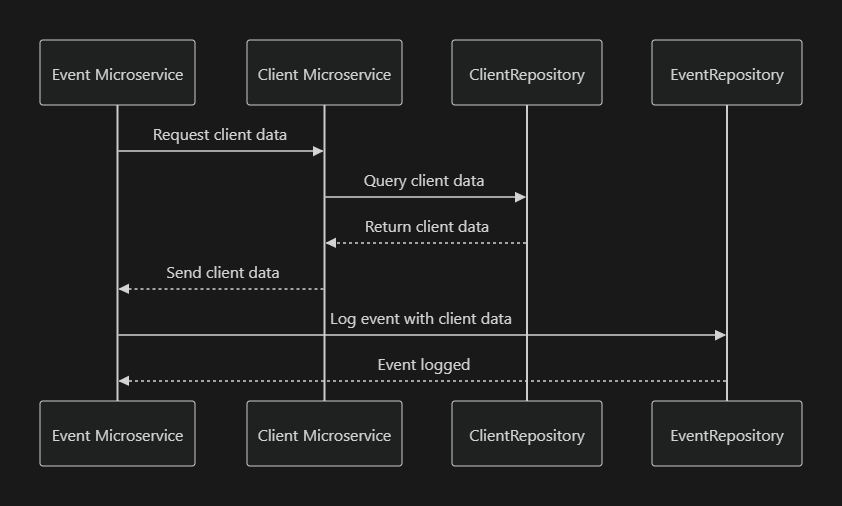
Example Interaction: Event Logging with Client Data
- Event Trigger: An event is triggered, which needs to log data related to a client.
- Event Microservice:
- Calls the Client Microservice to retrieve client-specific data.
- Logs the event data, including the client information.
- Client Microservice:
- Responds to the data request from the Event Microservice.
- May update its records based on the event data.
Event Microservice and Client Microservice Interaction
3. Data Sharing and Security
3.1 Data Sharing Between Microservices
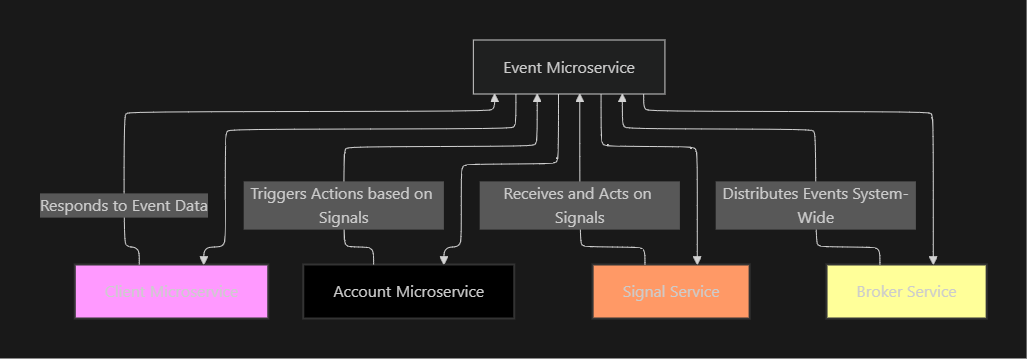
- Events and Signals:
- The Event Microservice shares event and signal data with other microservices to maintain system-wide consistency.
- It may send signals to trigger actions in other microservices.
- Brokers and Publishers:
- The Event Microservice uses brokers to distribute event data across the system, ensuring that all relevant microservices receive updates.
Data Sharing Across Microservices
3.2 Security Considerations
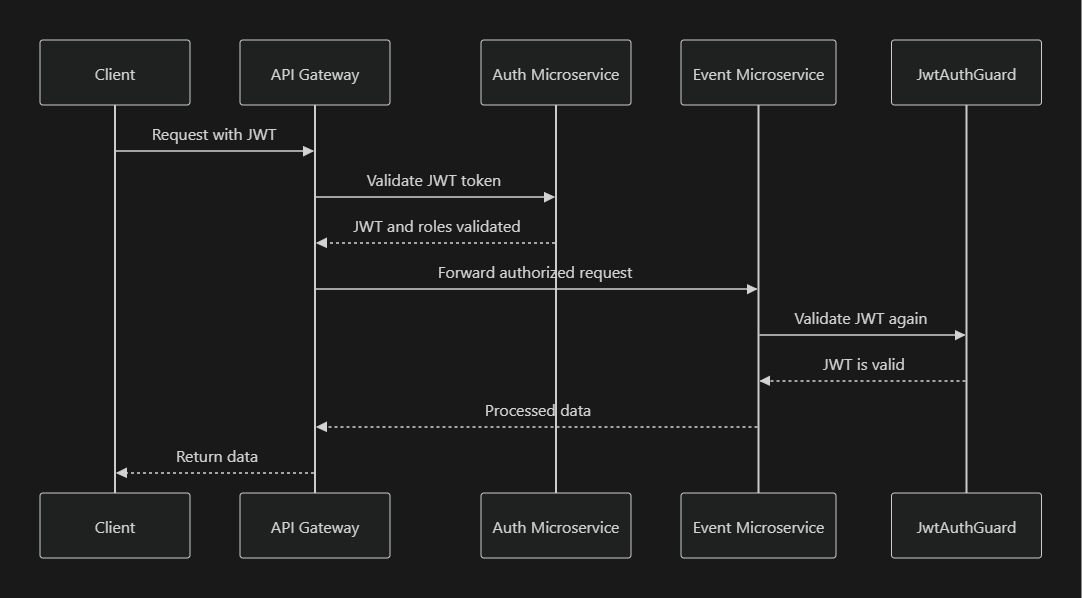
- JWT Validation:
- All requests passing through the API Gateway are validated via the Auth Microservice to ensure they are authorized.
- The Event Microservice implements additional security layers, such as JWT guards, to verify that only authenticated and authorized users can trigger or access events.
- Role-Based Access Control:
- The Event Microservice respects RBAC as managed by the Auth Microservice. Only users with appropriate roles can access certain event-related functionalities.
Security Flow
4. Detailed Example with Code Snippets
4.1 Event Creation and Distribution
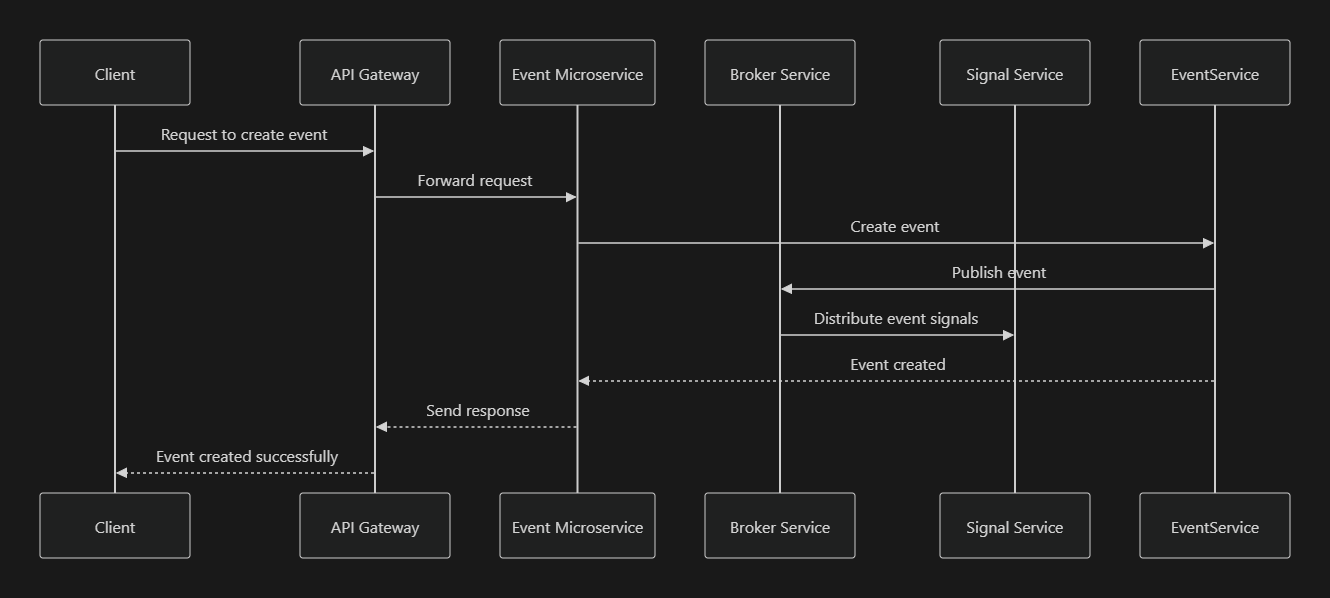
When an event is created in the Event Microservice, it might need to interact with other microservices and distribute the event data across the system.
Event Creation and Distribution
Event Creation
@Injectable()
export class EventService {
  constructor(
    private readonly eventRepository: EventRepository,
    private readonly brokerService: BrokerService,
  ) {}

  async createEvent(eventDto: CreateEventDto): Promise<Event> {
    const event = this.eventRepository.create(eventDto);
    await this.eventRepository.save(event);
    await this.brokerService.publishEvent(event); // Publish event to broker
    return event;
  }
}
5. Conclusion
The Event Microservice plays a crucial role in managing and distributing event data across the system. It interacts with the API Gateway for secure routing and authentication, and with other microservices like the Client and Account Microservices to ensure data consistency and system-wide coordination. Through a well-defined architecture and robust security mechanisms, the Event Microservice ensures that events are handled efficiently and securely within the microservices ecosystem.
Architecture between API gateway, thing microservice, event microservice, auth microservice, and account microservice.
1. Data Flow and Interaction
1.1 API Gateway to Thing Microservice
When a client sends a request related to an item, stock, or code, the API Gateway forwards this request to the Thing Microservice. The Thing Microservice processes the request and returns the necessary data or status back through the API Gateway to the client.
API Gateway to Thing Microservice Data Flow

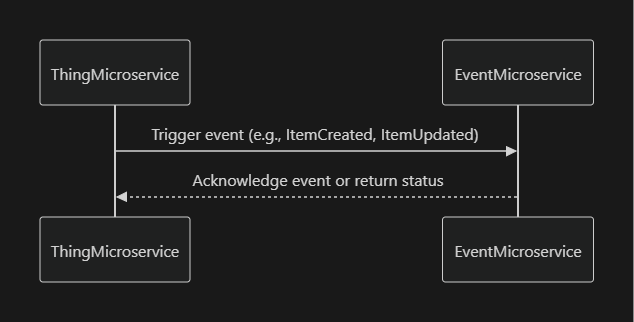
1.2 Thing Microservice and Event Microservice
The Thing Microservice triggers events when certain actions are performed, such as creating or updating an item. These events are sent to the Event Microservice for logging, notification, or further processing.
Thing Microservice to Event Microservice
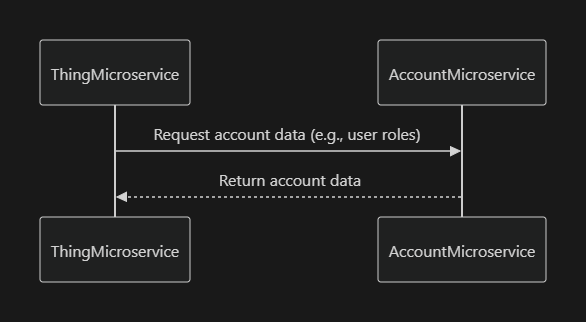
1.3 Thing Microservice and Account Microservice
The Thing Microservice may need to validate or retrieve account-related information, such as user roles or permissions, from the Account Microservice.
Thing Microservice to Account Microservice
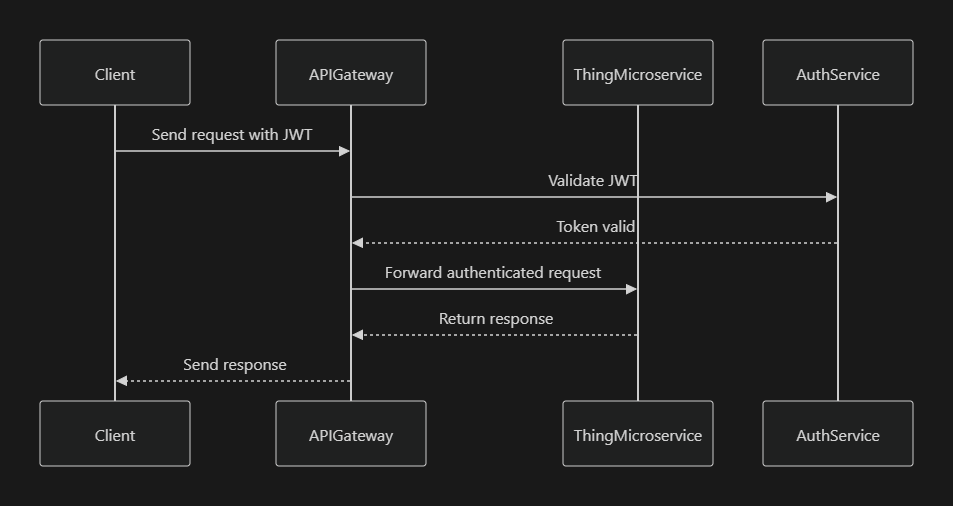
2. Security Considerations
The Thing Microservice relies on JWT-based authentication provided by the API Gateway. All requests passed to the Thing Microservice are validated for authenticity and permissions.
Authentication Flow
3 Example: Handling an Incoming Request in Thing Microservice
This snippet shows how the Thing Microservice might handle a request to fetch item details:
@Controller('items')
export class ItemController {
  constructor(private readonly itemService: ItemService) {}

  @Get(':id')
  async getItem(@Param('id') id: string): Promise<ItemDto> {
    return await this.itemService.findItemById(id);
  }
}

@Injectable()
export class ItemService {
  constructor(
    @InjectRepository(Item) private readonly itemRepo: Repository<Item>,
  ) {}

  async findItemById(id: string): Promise<ItemDto> {
    const item = await this.itemRepo.findOne(id);
    if (!item) {
      throw new NotFoundException('Item not found');
    }
    return item;
  }
}
6. Conclusion
The Thing Microservice is a critical component in a microservices architecture, handling item-related operations and interacting with various other microservices. The API Gateway serves as the entry point, ensuring security and routing requests appropriately. The relationships between the Thing Microservice, API Gateway, and other microservices are key to ensuring a smooth and efficient system.
The overall architecture of microservices.