Welcome to Event Microservice
1. Installation
1.1 Prerequisites
Before installing the Event Microservice, ensure that the following dependencies are installed:
- Node.js: Version 14.x or later
- npm: Version 6.x or later
- Docker: If you plan to use Docker for containerization
- TypeScript: Ensure TypeScript is installed globally
1.2 Cloning the Repository
Begin by cloning the Event Microservice repository:
git clone <repository url>
cd event-microservice
1.3 Installing Dependencies
Install the necessary Node.js packages:
npm i
1.4 Running the Service
To run the service in development mode:
npm run start:dev
For production:
npm run build
npm run start:prod
If using Docker, build and run the container:
docker-compose up --build
2. Overview of the Event Microservice Architecture
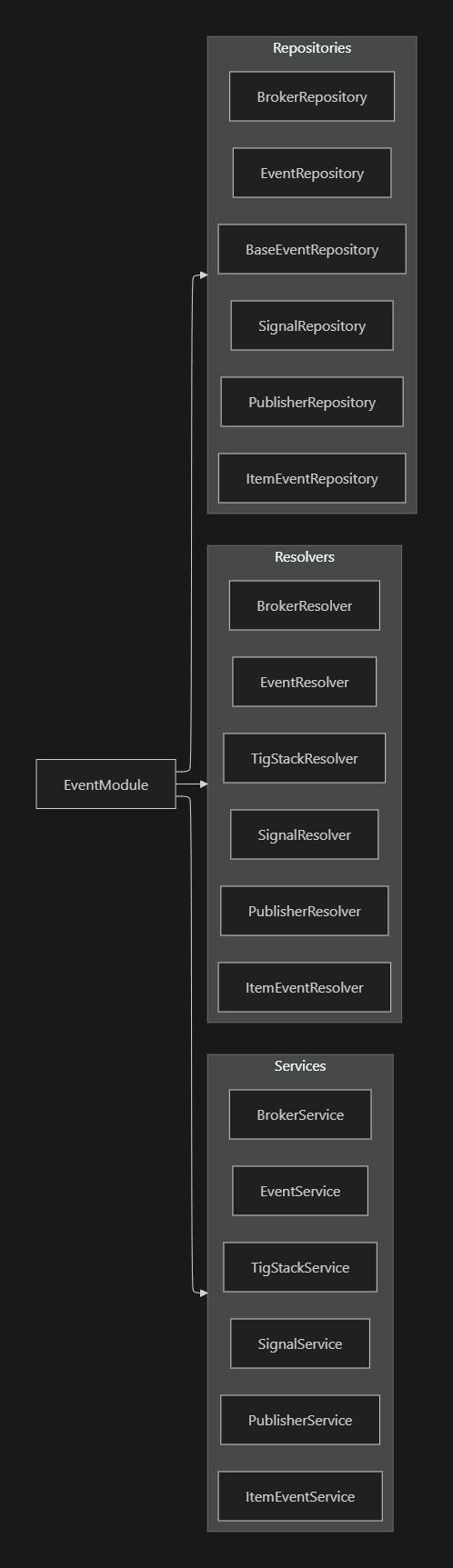
The Event Microservice is designed to handle events, signals, brokers, and related data. It processes and distributes event-related data across the system, interacting with various components within the microservice.
2.1 Core Components
- Modules:
EventModule: The primary module that organizes all the services, resolvers, and repositories.AuthModule: Manages authentication within the microservice.
- Services:
EventService,SignalService,BrokerService,PublisherService,ItemEventService,TigStackService: These services encapsulate the business logic for handling events, signals, brokers, and related operations.
- Resolvers:
- Handle GraphQL queries and mutations for events, signals, brokers, publishers, and item events.
- Repositories:
- Manage data persistence, handling CRUD operations for events, signals, brokers, and other entities in the database.
Event Microservice Architecture
3. Core Services
3.1 Event Service
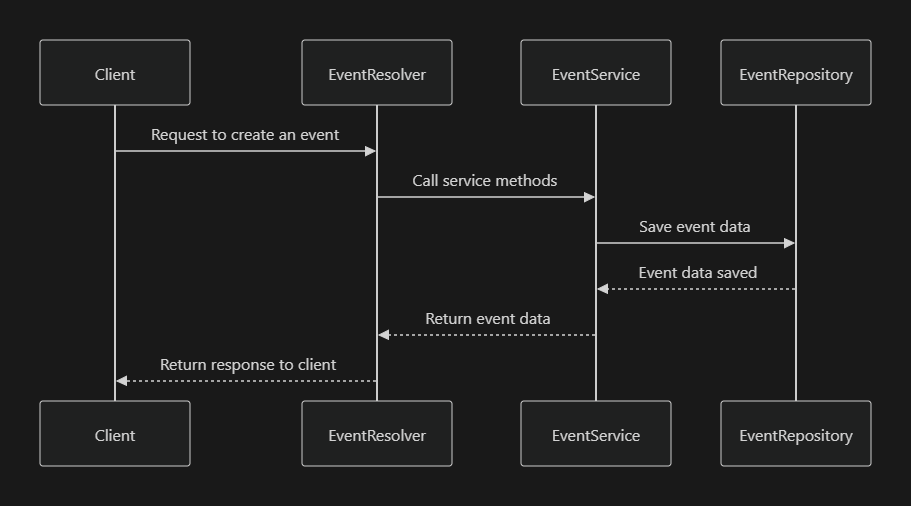
The EventService manages the creation, processing, and distribution of events within the system.
Event Service Interaction
Event Service
@Injectable()
export class EventService {
  constructor(
    @InjectRepository(Event) private eventRepo: Repository<Event>,
    private readonly brokerService: BrokerService,
  ) {}

  async createEvent(data: CreateEventDto): Promise<Event> {
    const event = this.eventRepo.create(data);
    await this.eventRepo.save(event);
    await this.brokerService.publishEvent(event); // Publish event to broker
    return event;
  }

  async findAllEvents(): Promise<Event[]> {
    return await this.eventRepo.find();
  }
}
3.2 Signal Service
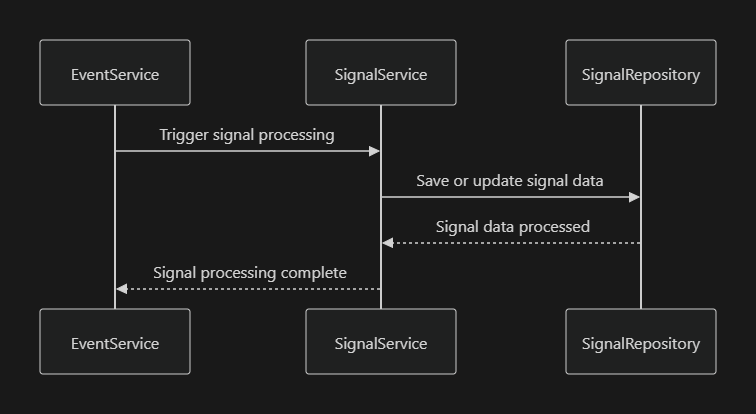
The SignalService handles the distribution and processing of signals related to events.
Signal Service Interaction
Signal Service
@Injectable()
export class SignalService {
  constructor(
    @InjectRepository(Signal) private signalRepo: Repository<Signal>,
  ) {}

  async processSignal(data: SignalDto): Promise<Signal> {
    const signal = this.signalRepo.create(data);
    return await this.signalRepo.save(signal);
  }
}
4. GraphQL Resolvers
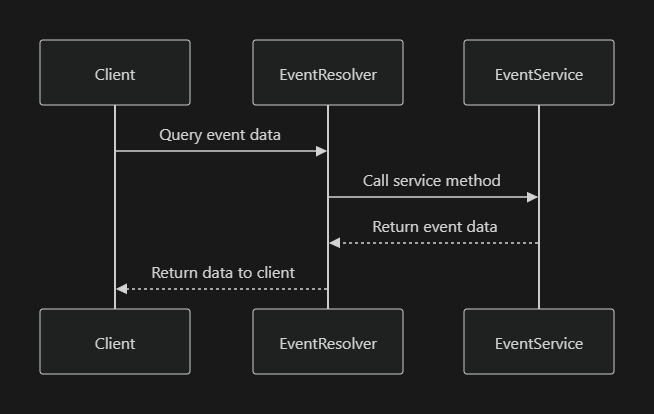
Resolvers in the Event Microservice translate incoming GraphQL queries and mutations into service calls.
4.1 Event Resolver
Handles queries and mutations related to events.
Event Resolver Flow
Event Resolver
@Resolver(() => Event)
export class EventResolver {
  constructor(private readonly eventService: EventService) {}

  @Query(() => [Event])
  async getAllEvents() {
    return this.eventService.findAllEvents();
  }

  @Mutation(() => Event)
  async createEvent(@Args('data') data: CreateEventDto) {
    return this.eventService.createEvent(data);
  }
}
5. Repositories
Repositories manage the persistence and retrieval of data from the database.
5.1 Event Repository
The EventRepository handles CRUD operations for event entities.
Event Repository Interaction
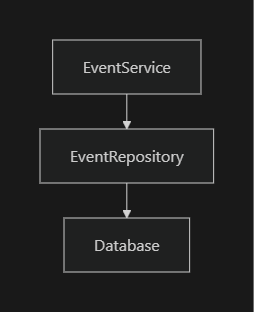
Event Repository
@EntityRepository(Event)
export class EventRepository extends Repository<Event> {}
6. Security and Authentication
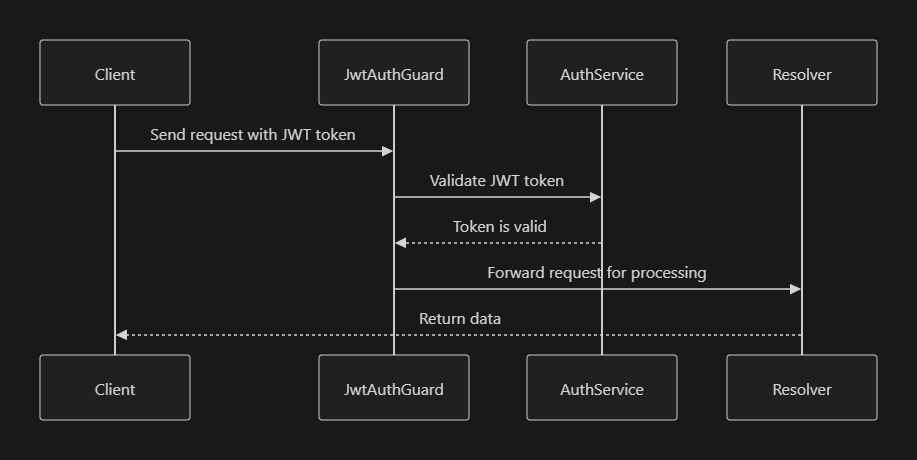
The Event Microservice uses JWT tokens for securing access to its endpoints. Authentication is handled by the AuthModule, which integrates with the JwtStrategy and JwtAuthGuard.
6.1 JWT Authentication Flow
- Client Request: A client sends a request with a JWT token.
- JWT Validation: The
JwtAuthGuardintercepts the request and validates the JWT token. - Authorized Access: If the token is valid, the request is processed by the appropriate resolver and service.
JWT Authentication Flow
JWT Auth Guard
@Injectable()
export class JwtAuthGuard extends AuthGuard('jwt') {}
7. Data Flow
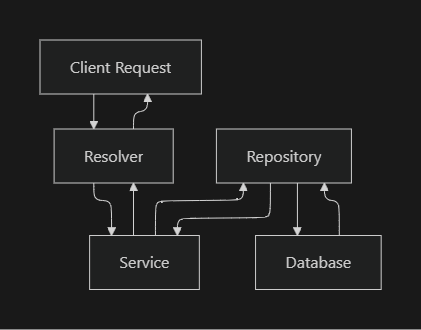
The data flow within the Event Microservice involves interaction between the client, resolvers, services, and repositories. Each component plays a specific role in processing requests and managing data.
Data Flow in Event Microservice
8. Detailed Example: Event Creation and Distribution
When an event is created in the Event Microservice, it triggers various processes, including data persistence, signal distribution, and interaction with brokers.
Event Creation and Distribution
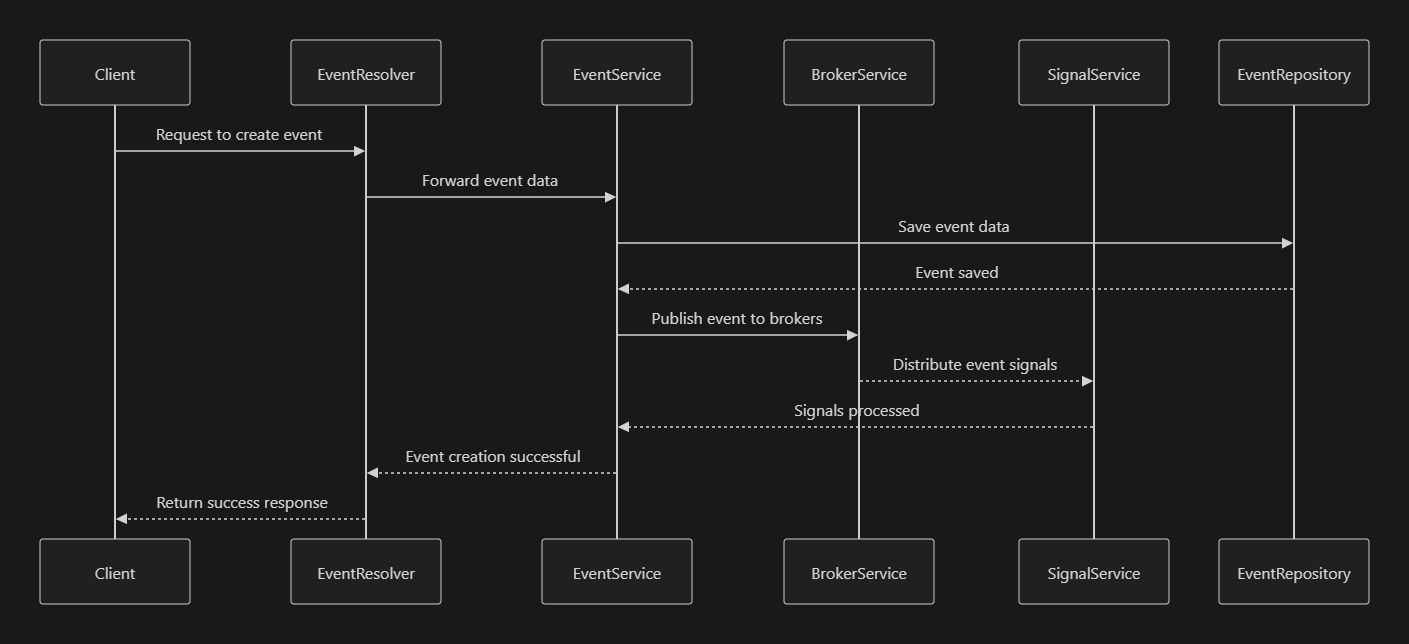
Event Service with Broker and Signal Integration
@Injectable()
export class EventService {
  constructor(
    private readonly eventRepo: EventRepository,

    private readonly brokerService: BrokerService,
    private readonly signalService: SignalService,
  ) {}

  async createEvent(data: CreateEventDto): Promise<Event> {
    const event = this.eventRepo.create(data);
    await this.eventRepo.save(event);
    await this.brokerService.publishEvent(event);
    await this.signalService.processSignal({ eventId: event.id });
    return event;
  }
}
Event creation update
The event in the Event microservices is created by submitting a payload to the mutation
9. Conclusion
The Event Microservice is a robust and modular system designed to handle events, signals, brokers, and related data. Through well-defined services, resolvers, and repositories, it manages the lifecycle of events from creation to distribution. Security is enforced through JWT-based authentication, ensuring that only authorized users can interact with the service.
Mutations and Queries
| Operation | Resolver (broker.resolver.ts) | Service (broker.service.ts) | Description |
|---|---|---|---|
getAllBrokers |
Accepts ConnectionArgs for pagination |
1. Gets limit and offset from pagination params 2. Calls repository's findAndCount 3. Creates paginated response using connectionFromArraySlice 4. Returns page and pageData |
Retrieves paginated list of all brokers |
getSpecificBroker |
Accepts broker ID as ObjectId | Calls repository's findOne with ID | Retrieves a single broker by ID |
createBroker |
Accepts CreateMQTTBrokerInput | Forwards to repository's createBroker method | Creates a new broker |
updateBroker |
Accepts UpdateBrokerInput | Forwards to repository's updateBroker method | Updates existing broker |
deleteBroker |
Accepts broker ID as string | 1. Finds broker by ID 2. Removes broker u |
| Operation | Resolver (event.resolver.ts) | Service (event.service.ts) | Description |
|---|---|---|---|
getAllEvents |
Accepts: 1. GetAllEventsInput filters 2. ConnectionArgs 3. Search string |
1. Gets limit and offset from pagination params 2. If search provided: - Gets filtered IDs and count - Finds events with those IDs - Orders by createdAt DESC 3. Creates paginated response 4. Returns page and pageData |
Retrieves paginated list of events with optional search |
viewEvent |
Accepts event ID as ObjectId | Calls repository's findOne with ID | Retrieves a single event by ID |
logEvent |
Accepts CreateEventInput | Forwards to repository's createEvent method | Creates a new event |
updateEvent |
Accepts UpdateEventInput | Forwards to repository's updateEvent method | Updates existing event |
deleteEvent |
Accepts event ID as string | 1. Finds event by ID 2. Removes event using removeAndFlush 3. Returns "success" |
Deletes an event |
signal (ResolveField) |
Resolves signal field for Event type | If event has signal, finds signal by ID using signalRepository |
| Operation | Resolver (item-event.resolver.ts) | Service (item-event.service.ts) | Description |
|---|---|---|---|
getAllItemEvents |
Accepts: 1. ConnectionArgs 2. Search string |
1. Gets limit and offset from pagination params 2. Calls repository's findAndCountWithSearch 3. Creates paginated response 4. Returns page and pageData |
Retrieves paginated list of all item events with search capability |
getAllUnprocessedItemEvents |
Accepts: 1. ConnectionArgs 2. Search string |
1. Gets limit and offset 2. Calls repository's findUnprocessed 3. Creates paginated response 4. Returns page and pageData |
Retrieves only unprocessed item events |
createItemEvent |
Accepts CreateItemEventInput | 1. Creates new ItemEvent instance 2. Sets all properties including defaults 3. Creates record using repository 4. Flushes changes |
Creates new item event with extensive property setting |
updateItemEvent |
Accepts UpdateItemEventInput | 1. Finds existing |
| Operation | Resolver (publisher.resolver.ts) | Service (publisher.service.ts) | Description |
|---|---|---|---|
getAllPublishers |
Accepts ConnectionArgs | 1. Gets limit and offset from pagination params 2. Calls repository's findAndCount 3. Creates paginated response 4. Returns page and pageData |
Retrieves paginated list of publishers |
viewPublisher |
Accepts publisher ID as ObjectId | Calls repository's findOne with ID | Retrieves single publisher by ID |
logPublisher |
Accepts CreatePublisherInput | Forwards to repository's createPublisher method | Creates new publisher |
updatePublisher |
Accepts UpdatePublisherInput | Forwards to repository's updatePublisher method | Updates existing publisher |
deletePublisher |
Accepts publisher ID as string | 1. Finds publisher by ID 2. Removes using removeAndFlush 3. Returns "success" |
Deletes a publisher |
microserviceEvents_2024 |
Accepts PublishEventDto | Forwards to mqttService's publish method | Publishes events through MQTT |
broker (ResolveField) |
Resolves broker field for Publisher type | If publisher has broker, finds broker b |
| Operation | Resolver (signal.resolver.ts) | Service (signal.service.ts) | Description |
|---|---|---|---|
getAllSignals |
Accepts ConnectionArgs, optional search string, and optional filters |
1. Gets limit and offset from pagination params 2. If search provided, calls getAllSignalsBySearch 3. Creates paginated response using connectionFromArraySlice 4. Orders results by time DESC when searching 5. Returns page and pageData |
Retrieves paginated list of signals with optional search functionality |
getSpecificSignal |
Accepts signal ID as ObjectId | Calls repository's findOne with ID | Retrieves a single signal by ID |
emitSignal |
Accepts signal ID as ObjectId | 1. Finds signal and associated publisher 2. Gets broker details (defaults to mqtt-2.omnivoltaic.com) 3. Connects to MQTT broker 4. Publishes signal's JMP data to publisher's topic 5. Returns "success" |
Publishes signal data to MQTT broker |
assignPublisherToSignal |
Accepts signal ID and publisher ID as ObjectIds | 1. Finds signal and publisher 2. Validates both exist 3. Associates publisher with signal 4. Flushes changes to database |
Links a publisher to a specific signal |
createSignal |
Accepts CreateSignalInput | Forwards to repository's createSignal method | Creates a new signal |
updateSignal |
Accepts UpdateSignalInput | Forwards to repository's updateSignal method | Updates existing signal |
deleteSignal |
Accepts SignalId as string | 1. Finds signal by ID 2. Removes signal 3. Returns "success" |
Deletes a signal |
archiveSignalClassByTimeStamp |
Accepts optional start and end dates | 1. Checks/creates S3 bucket object 2. Retrieves signals based on date range 3. Merges with existing archived data 4. Uploads to S3 5. Removes archived signals from repository |
Archives signals to S3 based on timestamp range |
restoreSignalClassWithTimeStamp |
Accepts optional start and end dates | 1. Retrieves archived data from S3 2. Filters signals based on date range 3. Recreates signal objects with original IDs 4. Relinks publishers 5. Persists restored signals |
Restores archived signals from S3 based on timestamp range |
publisher (ResolveField) |
Parent signal passed automatically | 1. Checks if publisher exists 2. If yes, finds publisher by ID 3. If no, returns null |
| Operation | Resolver (tig-stack.resolver.ts) | Service (tig-stack.service.ts) | Description |
|---|---|---|---|
createDistributorTIGStackSubDomain |
Accepts CreateDistributorTIGStackSubDomainInput with:- name - distributorEmail - distributorGrafanaPort - distributorInfluxDBPort - distributorMQTTPort - distributorMQTTPassword |
1. Clones GitHub repository 2. Updates email in distributor.sh 3. Updates Caddyfile with proxy config 4. Generates mosquitto.conf 5. Updates password file 6. Updates telegraf.conf 7. Creates/updates docker-compose.yml 8. Commits and pushes changes 9. Creates Cloudflare DNS record 10. Returns success/error response |
Creates complete TIG stack setup for a new distributor |
cloneRepo |
N/A | 1. Constructs clone URL with auth token 2. Clones repository to local path 3. Changes to repo directory 4. Checks out specified branch |
Clones TIG stack repository for modifications |
commitAndPush |
N/A | 1. Sets git config with username/email 2. Pulls latest changes 3. Updates remote URL with token 4. Stages all changes 5. Commits with message 6. Pushes to specified branch |
Saves and pushes configuration changes |
replaceEmailInFile |
N/A | 1. Updates distributor.sh email 2. Updates Caddyfile proxy settings 3. Updates docker-compose file 4. Updates Dockerfile port exposure 5. Manages service configurations |
Updates configuration files with distributor details |
generateMosquittoConf |
N/A | 1. Creates MQTT broker config 2. Sets up bridge connection 3. Configures TLS and auth 4. Updates mosquitto.sh 5. Sets up topic routing |
Configures MQTT broker settings |
updateFileAndCreatePasswordFile |
N/A | 1. Updates mosquitto.sh 2. Creates/updates password.txt 3. Stores credentials |
Manages MQTT authentication |
updateTelegrafFile |
N/A | 1. Creates telegraf.conf 2. Configures inputs (MQTT, system) 3. Sets up InfluxDB output 4. Configures monitoring intervals |
Sets up metrics collection |
createOrUpdateTIGStackDockerComposeFile |
N/A | 1. Creates/loads docker-compose.yml 2. Configures Caddy service 3. Sets up Grafana service 4. Configures MQTT service 5. Sets up InfluxDB service 6. Configures Telegraf service 7. Saves updated config |
Manages container orchestration |
deleteLocalRepo |
N/A |
Purpose of the Event Microservice
The Event microservice is designed to manage and record various actions or occurrences within the system. It plays a crucial role in tracking activities and interactions by capturing detailed event data.
Goals
- Activity Recording: Capture and record significant actions or occurrences within the system, providing a detailed log of system events.
- Real-time Monitoring: Enable real-time monitoring of activities, facilitating immediate response to critical events or anomalies.
- Insight Generation: Provide valuable insights into system operations and user behaviors through comprehensive event logging.
Key Components
Core Elements of an Event
- Event Identifier: A unique identifier for each observable and relevant occurrence within the system.
- Actor: Represents the entity initiating the event. This could be integrated with objects from Thing, Person, or Client services for more detailed information.
- Place: Specifies the location of the event using geographical coordinates and addresses.
- Time: Records the exact time of the event using a universal timestamp.
- Message: The content or signal emitted by the event, which can trigger reactions or further actions in the system.
Functionality and Usage
- Event Recording:
- The service captures and records various types of events occurring within the system.
- Capturing Events: The microservice is designed to capture a wide array of events within your company’s systems. An event, in this context, refers to any significant occurrence or action that needs to be tracked. This could range from user actions, system changes, transactions, to other significant activities.
- Comprehensive Event Data: Each event captured includes several key components:
- Actor: This is the initiator of the event. It could be a user, a system process, or any entity that triggers the event. The microservice can link this actor to other objects in services like Thing, Person, or Client, providing a richer context and more detailed information about who or what initiated the event.
- Place: It records the spatial location where the event occurred. This is particularly important for events that are geographically specific or for tracking movements and locations in real-time.
- Time: The exact timestamp of when the event occurred is recorded. This is crucial for creating a chronological record and for time-specific analysis.
- Message: This is the information or data emitted by the event. It could be a simple notification, a detailed data payload, or a signal intended to trigger other processes or workflows.
- Integration with Other Services:
- The microservice doesn’t operate in isolation but integrates with other services in your company. For instance, linking with the Thing service for events related to physical devices, or the Client service for events involving client interactions.
-
This integration capability allows for a holistic view of events across different aspects of your business operations.
-
Triggers and Automated Responses
-
Events captured can be utilized to trigger automated responses or workflows. For example, if a specific type of event occurs, it could automatically initiate a process or alert the relevant teams or systems.
- Data Retrieval and Analysis:
- By aggregating and analyzing event data, the service provides valuable insights. This could include understanding user behavior, system performance, operational efficiency, and more.
- The data can be used for real-time monitoring as well as for historical analysis and reporting.