Welcome to Auth Microservice
1. Installation
1.1 Prerequisites
Before setting up the Auth Microservice, ensure that you have the following dependencies installed:
- Node.js: Version 14.x or later
- npm: Version 6.x or later
- Docker: For containerization and running dependent services like Redis
- TypeScript: Installed globally for TypeScript compilation
- Git: For version control
1.2 Cloning the Repository
Start by cloning the Auth Microservice repository:
git clone <repository url>
cd auth-microservice
1.3 Installing Dependencies
Install the required Node.js packages:
npm install
1.4 Environment Configuration
Create a .env file in the root directory and configure your environment variables. This file should include settings for database connections, JWT secrets, Redis, and other service configurations.
Example .env:
DATABASE_URL=
REDIS_URL=
JWT_SECRET=
1.5 Running the Service
To run the service in development mode:
npm run start:dev
For production:
npm run build
npm run start:prod
If using Docker, build and run the container:
docker-compose up --build
2. Architecture Overview
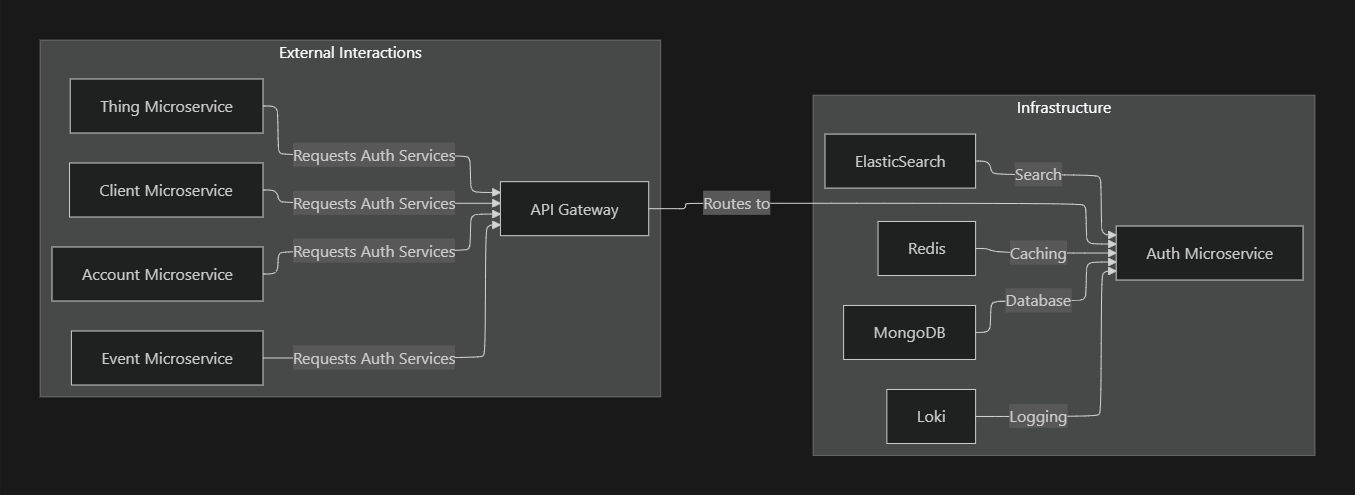
The Auth Microservice is designed as a modular service responsible for authentication, authorization, and user management. It integrates with other microservices to secure API access and manage user roles and permissions.
High-Level Architecture
3. Core Components
The Auth Microservice is composed of several key components, each serving a specific function. Below are the primary components:
3.1 Modules
- UsersModule: Manages user-related operations such as registration, authentication, and profile updates.
- RolesModule: Handles roles and permissions within the system, ensuring proper authorization.
- AuthModule: Central to the microservice, it manages the core authentication logic, including JWT handling.
- SubRolesModule: Manages sub-roles that add another layer of permission granularity.
- PermissionsModule: Manages specific permissions within the system.
Module Organization

4. User Management
The UsersModule is responsible for handling user-related operations, such as user creation, authentication, and profile updates. This module integrates closely with the RolesModule and PermissionsModule to ensure that users have appropriate access within the system.
4.1 User Registration Flow
When a user registers, the system captures their information, hashes their password, and stores it in the PostgreSQL database. The system also assigns default roles and permissions.
User Registration
@Injectable()
export class UsersService {
  constructor(
    @InjectRepository(User) private userRepository: Repository<User>,
    private readonly rolesService: RolesService,
    private readonly bcryptService: BcryptService,
  ) {}

  async registerUser(userDto: CreateUserDto): Promise<User> {
    const hashedPassword = await this.bcryptService.hash(userDto.password);
    const newUser = this.userRepository.create({ ...userDto, password: hashedPassword });
    const defaultRole = await this.rolesService.getDefaultRole();
    newUser.roles = [defaultRole];
    return await this.userRepository.save(newUser);
  }
}
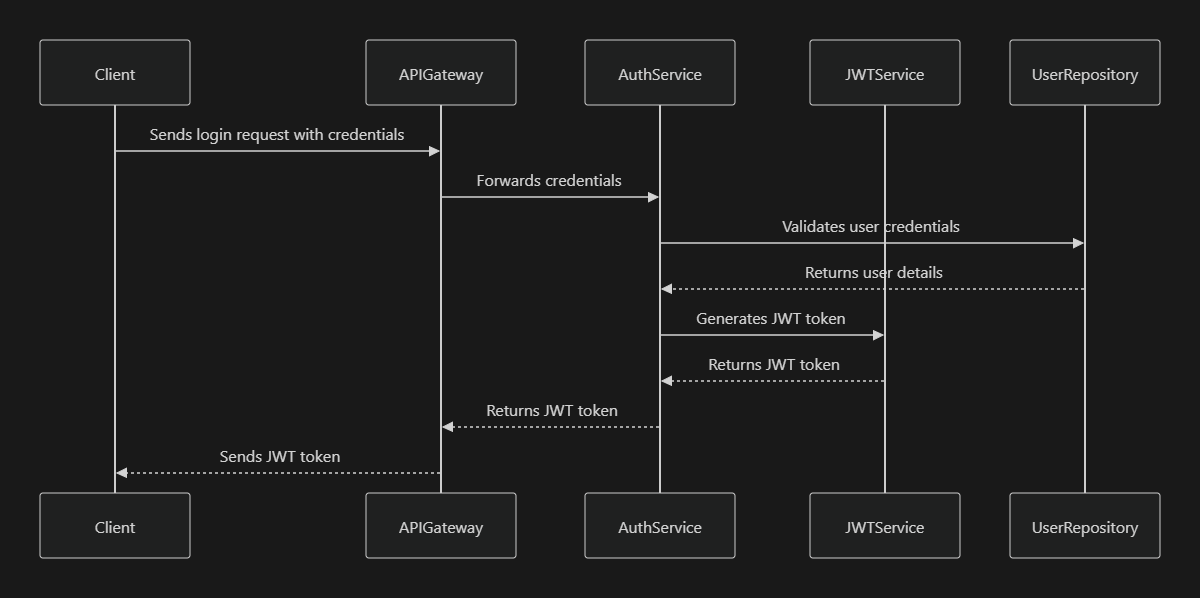
4.2 User Authentication
Authentication is handled via JWT tokens. Upon successful login, the system generates a JWT token that the client uses for subsequent API requests.
Authentication Flow
5. Roles and Permissions
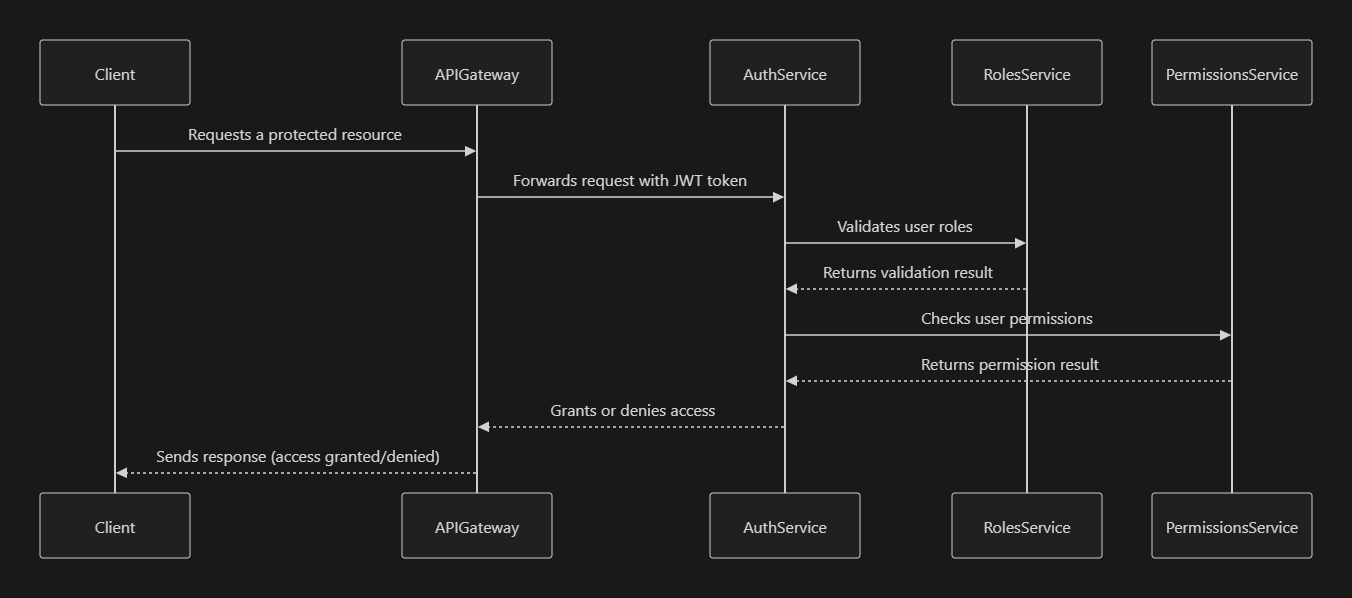
The RolesModule and PermissionsModule are crucial for managing user access levels within the system. These modules allow for flexible role-based access control (RBAC), enabling administrators to define and assign roles with specific permissions to users.
5.1 Roles and Permissions Management
Roles define what actions a user can perform, while permissions provide granular control over these actions. The system uses decorators and guards to enforce role and permission checks on protected routes.
Role Guard
@Injectable()
export class RolesGuard implements CanActivate {
  constructor(private readonly reflector: Reflector) {}

  canActivate(context: ExecutionContext): boolean {
    const requiredRoles = this.reflector.get<string[]>('roles', context.getHandler());
    if (!requiredRoles) {
      return true;
    }
    const { user } = context.switchToHttp().getRequest();
    return requiredRoles.some((role) => user.roles.includes(role));
  }
}
Roles and Permissions Flow
6. Caching with Redis
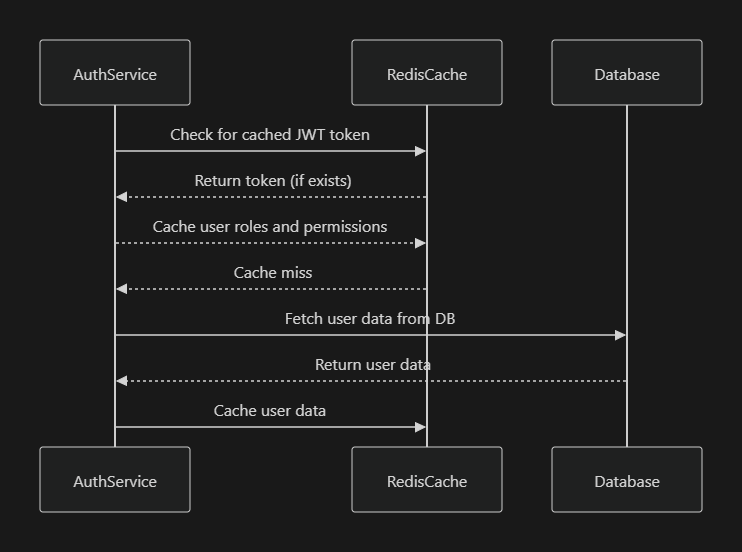
The Auth Microservice uses Redis for caching session information, JWT tokens, and user roles to enhance performance and reduce database load.
6.1 Redis Integration
Redis is integrated into the microservice using a dedicated Redis service that interacts with the cache module. Cached data includes JWT tokens, user sessions, and role information.
Redis Caching Flow
7. Database Integration (MongoDB)
The Auth Microservice uses MongoDB to store user information, roles, permissions, and other related data. The service uses TypeORM as the ORM to interact with the database.
7.1 Database Schema
The schema includes tables for users, roles, permissions, and related join tables.
User Entity
@Entity()
export class User {
  @PrimaryGeneratedColumn()
  id: number;

  @Column({ unique: true })
  email: string;

  @Column()
  password: string;

  @ManyToMany(() => Role)
  @JoinTable()
  roles: Role[];
}
8. Security Considerations
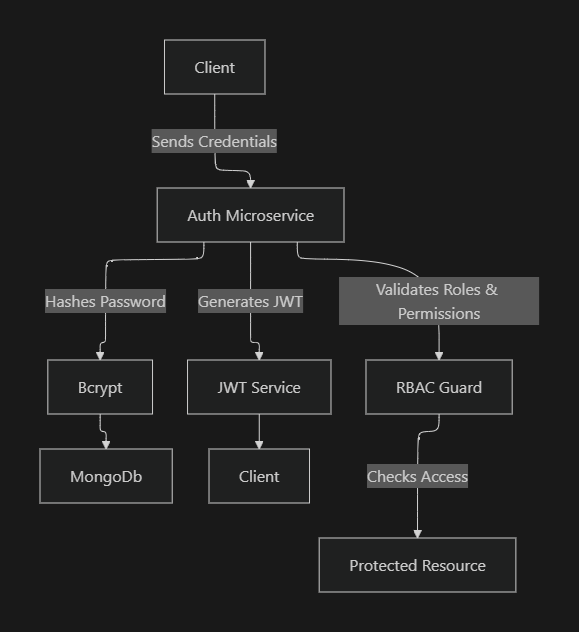
The Auth Microservice incorporates several security measures to ensure safe and reliable operation:
- Password Hashing: All passwords are hashed using bcrypt before being stored in the database.
- JWT Tokens: JSON Web Tokens (JWT) are used for stateless authentication, ensuring secure session management.
- Role-Based Access Control (RBAC): Roles and permissions are enforced using guards and decorators, ensuring that only authorized users can access specific resources.
- Rate Limiting: Rate limiting can be applied to login endpoints to prevent brute-force attacks.
Security Flow
9. Logging and Monitoring
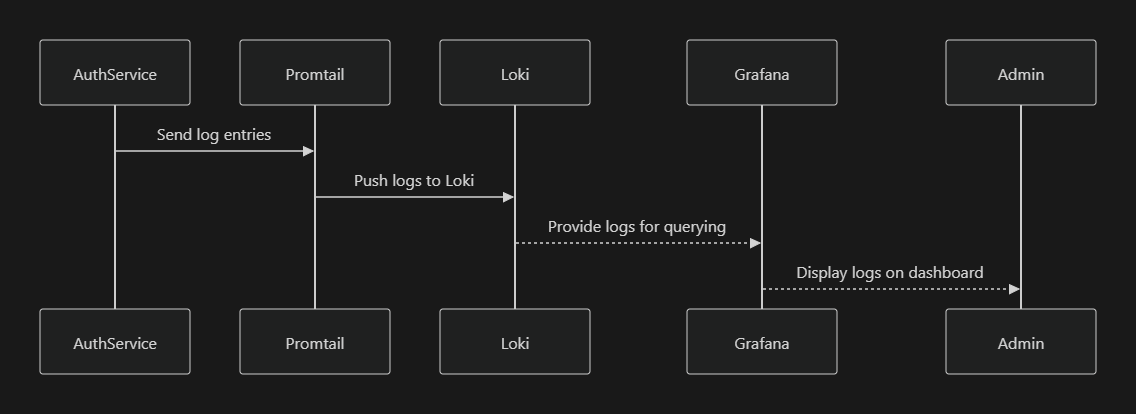
The Auth Microservice includes logging for auditing and monitoring purposes, using tools like Loki and Promtail for log aggregation and Grafana for visualization.
9.1 Loki and Promtail for Logging
Logs are collected by Promtail and pushed to Loki, where they can be queried and visualized in Grafana.
Logging Flow
10.User Signup and Signin process
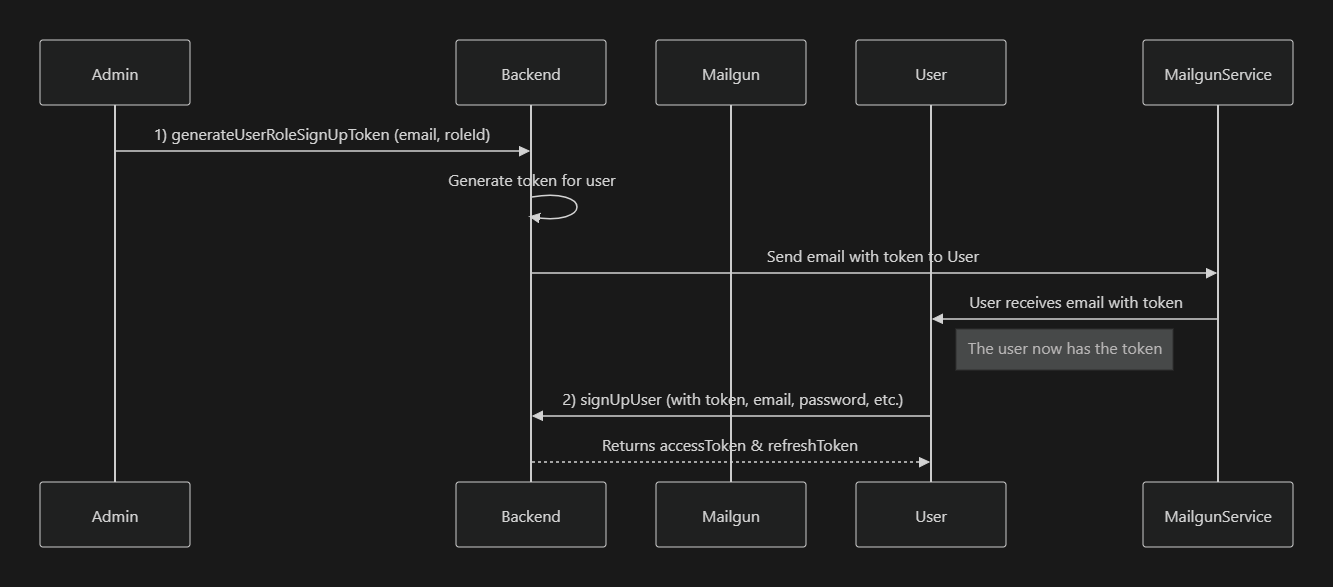
This flow allows an admin to invite new users (distributors or any other role) into the system by sending them an email containing a signup token. The invited user can then complete their registration by using the token in a SignUp mutation.
The flow consists of two main steps:
- GenerateUserRoleSignUpToken
- Admin calls a mutation to generate a token for a specific user (based on their email) and role.
- The system sends an email to the user that includes this token.
- SignUpUser
- The user receives the token via email.
- The user calls the signup mutation using the received token, along with other required details (e.g., password).
- On success, the system returns an
accessTokenandrefreshToken.
GenerateUserRoleSignUpToken
GraphQL Mutation:
mutation GenerateUserRoleSignUpToken {
  generateUserRoleSignUpToken(
    generateUserRoleSignUpTokenInput: {
      email: "admin@graphit.software",
      roleId: "61766d39f74eeb440e34f096"
    }
  ) {
    message
    status
  }
}
Purpose
- To create a signup token tied to a specific email and role.
- The system (backend) will typically send this token via email to the provided email address.
Response Example
{
  "data": {
    "generateUserRoleSignUpToken": {
      "message": "Success",
      "status": 200
    }
  }
}
A successful response indicates that the token was generated and that the email with the token should have been sent to the user.
How to get roles
query GetAllRoles {
    getAllRoles(first: 100) {
        page {
            edges {
                cursor
                node {
                    _id
                    deleteStatus
                    deleteAt
                    createdAt
                    updatedAt
                    name
                }
            }
        }
    }
}

//return values

{
    "data": {
        "getAllRoles": {
            "page": {
                "edges": [
                    {
                        "cursor": "YXJyYXljb25uZWN0aW9uOjA=",
                        "node": {
                            "_id": "617668caf74eeb089b34ee83",
                            "deleteStatus": false,
                            "deleteAt": null,
                            "createdAt": "2021-10-25T08:20:26.690Z",
                            "updatedAt": "2021-10-25T08:20:26.690Z",
                            "name": "SUPER_ADMIN"
                        }
                    },...
SignUpUser
Once the user receives the token in their email, they can complete their registration using the SignUpUser mutation.
GraphQL Mutation:
mutation SignUpUser {
  signUpUser(
    signUpCredentials: {
      firstName: "John"
      lastName: "Doe"
      idType: "Passport"
      idString: "AB1234567"
      birthDate: "1990-01-01"
      profile: "distributorProfileId"
      email: "john.doe@example.com"
      authenticationToken: "RECEIVED_TOKEN_FROM_EMAIL"
      password: "SuperSecretPassword123"
    }
  ) {
    accessToken
    refreshToken
  }
}
Response Example
{
  "data": {
    "signUpUser": {
      "accessToken": "eyJhbGciOiJIUzI1NiIsInR5cCI6IkpXVCJ9...",
      "refreshToken": "eyJhbGciOiJIUzI1NiIsInR5cCI6IkpXVCJ9..."
    }
  }
}
A successful sign-up returns an accessToken and refreshToken that the user can use to authenticate subsequent requests to the system.
4. Flow Diagram (Mermaid)
Below is a Mermaid sequence diagram describing the flow from token generation by the admin to final user signup.
11. Conclusion
The Auth Microservice is built using NestJS for a modular and scalable architecture, GraphQL for efficient and flexible client-server communication, and JWT (JSON Web Token) for secure token-based authentication. It employs bcrypt for robust password hashing, ensuring user credentials are stored securely, and uses RSA key pairs for signing and verifying JWTs, adding layer of security. The microservice also leverages Mikro-ORM for seamless interaction with the MongoDB database, Mailgun for email services, and Passport.js for implementing authentication strategies, all of which work together to create a comprehensive and secure authentication system.