API Gateway
The API Gateway is the entry point for all client requests, coordinating requests between multiple microservices in your system. This setup uses Apollo Gateway within a NestJS application, providing a unified GraphQL interface for all services. The gateway also implements throttling to protect against abuse and utilizes CSRF tokens to secure certain requests.
API endpoint
https://dev-federated-graphql-api.omnivoltaic.com/graphql
1. Installation
Prerequisites
Before setting up the API Gateway, ensure you have the following installed:
- Node.js (version 16 or higher)
- Docker and Docker Compose
- NestJS CLI (optional for development)
Installation Steps
-
Clone the Repository
First, clone the repository that contains the API Gateway code.
git clone <repository_url> cd <repository_directory> -
Install Dependencies
Install the necessary dependencies using npm.
npm i -
Environment Variables
Create a
.envfile in the root of the project and set up the necessary environment variables. Example:PORT= SESSION_SECRET= AUTH_MICROSERVICE_URL= THING_MICROSERVICE_URL= CLIENT_MICROSERVICE_URL= ACCOUNT_MICROSERVICE_URL= EVENT_MICROSERVICE_URL= -
Build and Run
You can build and run the application using Docker Compose.
docker-compose up --buildThis command will build the Docker images and start the containers for the API Gateway and its dependencies.
-
Access the API Gateway
Once the containers are up and running, the API Gateway will be accessible at
http://localhost:3000/graphql.
2. Data Flow Overview
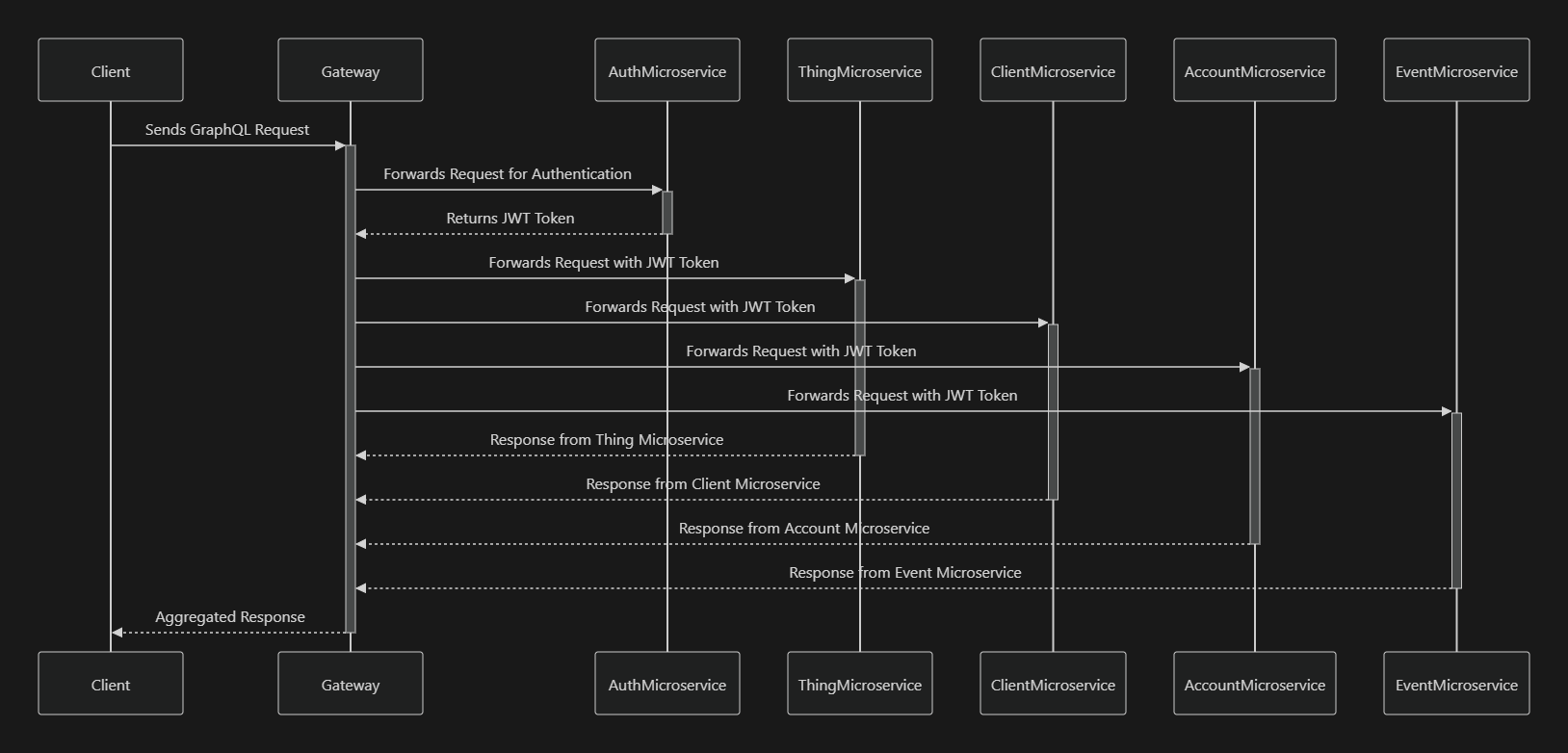
The API Gateway acts as a single entry point for multiple microservices, including:
- Auth Microservice
- Thing Microservice
- Client Microservice
- Account Microservice
- Event Microservice
It handles incoming GraphQL requests, processes them, and forwards them to the appropriate microservice based on the query. The flow of data through the API Gateway can be visualized as follows:

3. Authentication Flow in the Gateway API
The authentication process in the API Gateway is designed to ensure secure communication between the client and the microservices. Here's a step-by-step explanation of how authentication works:
Step 1: Client Sends Authentication Request
- The client sends a request to the API Gateway with the authentication details, typically in the form of a login mutation.
Step 2: Gateway Forwards Request to Auth Microservice
-
The Gateway forwards this request to the Auth Microservice.
request.http.headers.set('Authorization', `Bearer ${token}`); -
The Auth Microservice verifies the credentials (e.g., username and password) and, if valid, generates a JWT token.
Step 3: Auth Microservice Returns JWT Token
- The Auth Microservice returns the JWT token to the Gateway.
Step 4: Gateway Stores and Uses JWT Token
- The Gateway stores the JWT token and includes it in the headers of subsequent requests to other microservices.
Step 5: Authorized Requests to Other Microservices
-
For any other request, the Gateway includes the JWT token in the
Authorizationheader and forwards the request to the appropriate microservice.request.http.headers.set('Authorization', context.authorization); -
Each microservice verifies the token before processing the request, ensuring that only authorized requests are handled.
Step 6: Response Sent Back to Client
- After processing the request, the microservice returns the response to the Gateway, which then forwards the response back to the client.
Step 7: Token Expiry and Refresh
- The JWT token has an expiration time. If a token is expired, the client must re-authenticate to obtain a new token.
4. Deployment
Deploying the API Gateway involves running the Docker containers on your chosen environment. The provided docker-compose.yml file facilitates deploying the Gateway along with its dependencies.
Running in Production
-
Build and Start Services:
docker-compose -f docker-compose.yml up -d --build -
Monitoring:
- You can monitor the services by checking the logs:
docker-compose logs -f -
Scaling Services:
To scale a service (e.g., the Gateway), you can use:
docker-compose up --scale gateway=3 -dThis command would run three instances of the API Gateway.
Conclusion.
The API Gateway serves as a crucial component in microservices architecture, providing a unified entry point for client requests. By leveraging Apollo Gateway within a NestJS framework, this gateway efficiently routes requests to the appropriate microservices while ensuring robust security and performance through features like request throttling and CSRF protection.