Welcome to Account Microservice
1. Overview
Account microservice is designed to manage various aspects of a larger system, including assets, accounts, users, messages, and events. The service uses TypeScript and NestJS and includes multiple components such as resolvers, services, decorators, workers, and middleware. The system interacts with Redis for caching, utilizes JWT for authentication, and is designed to handle various entities like Asset Accounts, Persons, Distributors, Agents, and more.
2. Installation
To set up the project, you'll need Docker, Docker Compose, Node.js, and Yarn or npm installed on your machine. The installation process involves building and running the Docker containers, which will set up the microservice and its dependencies.
Step 1: Clone the Repository
git clone <repository-url>
cd <project-directory>
Step 2: Install Dependencies
yarn install
or
npm install
Step 3: Build and Run Docker Containers
This project includes a Dockerfile and docker-compose.yml to simplify deployment.
docker-compose up --build
Step 4: Environment Variables
Ensure that the necessary environment variables are set up in a .env file. This includes configurations for database connections, Redis, JWT secrets, and other necessary settings.
3. Authentication
The microservice uses JWT (JSON Web Token) for authentication. The authentication flow involves generating a JWT during the login process and validating it in subsequent requests.
Key Components:
jwt.strategy.ts: Defines the JWT strategy used for validating tokens.jwt-auth.guard.ts: Guards routes by enforcing JWT validation.jwttoken.builder.ts: Responsible for creating JWTs.
Authentication Flow
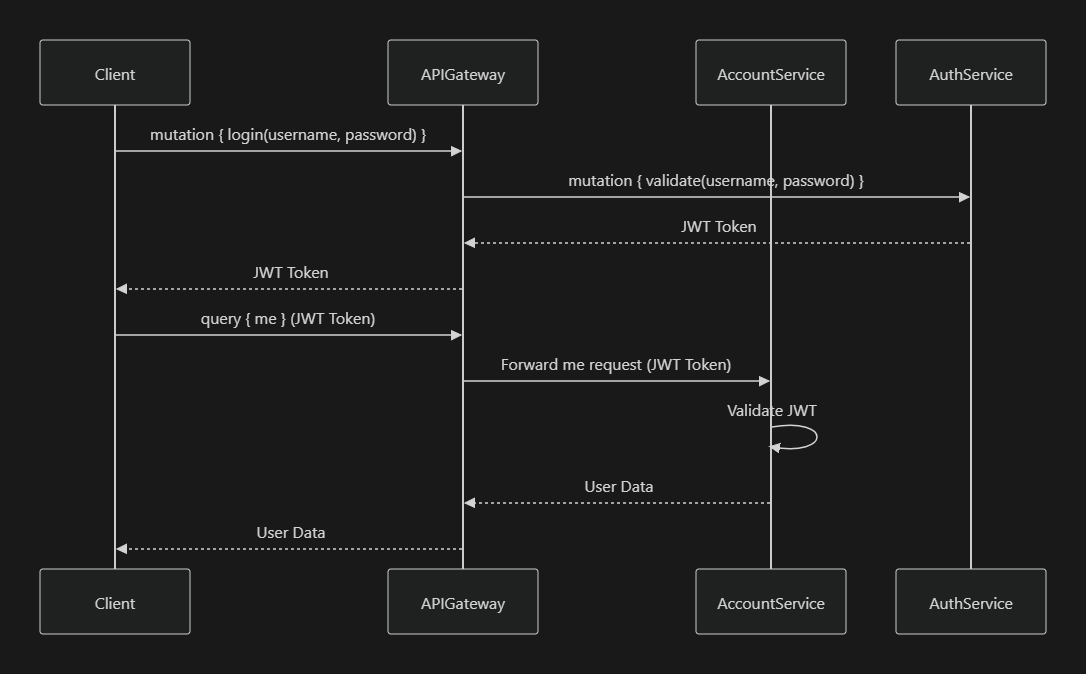
JWT Strategy
@Injectable()
export class JwtStrategy extends PassportStrategy(Strategy) {
  constructor(private readonly authService: AuthService) {
    super({
      jwtFromRequest: ExtractJwt.fromAuthHeaderAsBearerToken(),
      ignoreExpiration: false,
      secretOrKey: process.env.JWT_SECRET,
    });
  }

  async validate(payload: JwtPayload) {
    return { userId: payload.sub, username: payload.username };
  }
}
4. Redis Integration
Redis is used for caching within this microservice. The redis.service.ts file handles the interaction with the Redis server, providing methods to set, get, and delete cache entries.
Redis Caching Flow
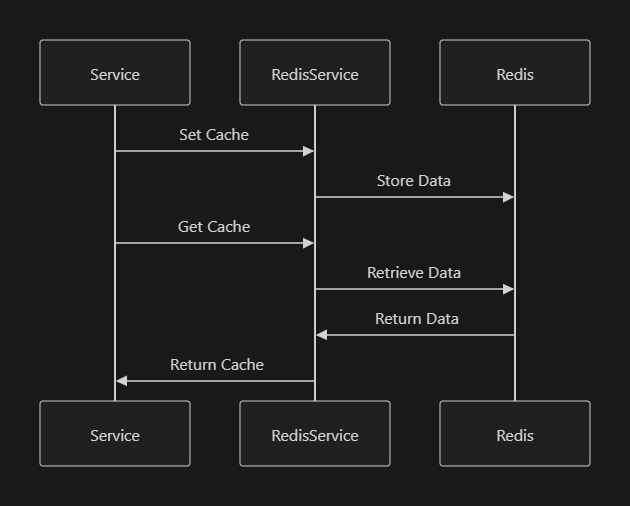
Redis Service
@Injectable()
export class RedisService {
  private client: RedisClient;

  constructor() {
    this.client = createClient({
      host: process.env.REDIS_HOST,
      port: parseInt(process.env.REDIS_PORT),
    });
  }

  async set(key: string, value: any) {
    return this.client.set(key, JSON.stringify(value));
  }

  async get(key: string) {
    return new Promise((resolve, reject) => {
      this.client.get(key, (err, data) => {
        if (err) reject(err);
        resolve(JSON.parse(data));
      });
    });
  }

  async delete(key: string) {
    return this.client.del(key);
  }
}
5. Asset Management
The service provides comprehensive management of assets, including creation, updating, and querying of asset accounts. The assetaccount.service.ts and assetaccount.resolver.ts handle the logic for managing asset accounts.
Mermaid Diagram: Asset Account Flow
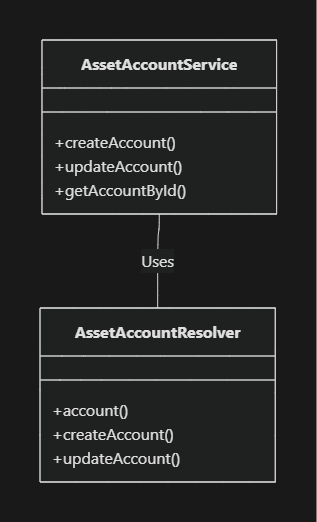
Create Asset Account
@Injectable()
export class AssetAccountService {
  async createAccount(dto: CreateAssetAccountDto): Promise<AssetAccount> {
    const account = new AssetAccount();
    account.name = dto.name;
    account.balance = dto.balance;
    // Additional logic
    return await this.assetAccountRepository.save(account);
  }
}

@Resolver(() => AssetAccount)
export class AssetAccountResolver {
  constructor(private readonly assetAccountService: AssetAccountService) {}

  @Mutation(() => AssetAccount)
  async createAccount(@Args('input') input: CreateAssetAccountDto) {
    return this.assetAccountService.createAccount(input);
  }
}
6. Messaging System
The messaging system manages templates, groups, and the generation of messages based on predefined templates. The message-template.service.ts, message-group.service.ts, and message-from-template.service.ts provide the necessary methods to handle messaging.
Messaging Flow
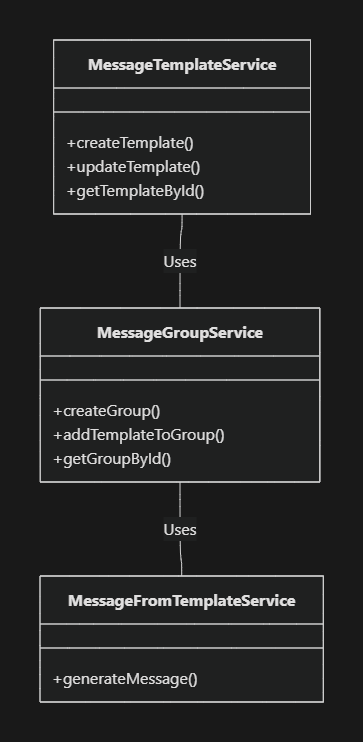
Generate Message from Template
@Injectable()
export class MessageFromTemplateService {
  constructor(
    private readonly messageTemplateService: MessageTemplateService,
    private readonly messageGroupService: MessageGroupService
  ) {}

  async generateMessage(templateId: string, data: any): Promise<string> {
    const template = await this.messageTemplateService.getTemplateById(templateId);
    // Replace placeholders in template with data
    return this.replacePlaceholders(template.content, data);
  }

  private replacePlaceholders(template: string, data: any): string {
    // Implementation logic
    return template;
  }
}
7. Middleware and Workers
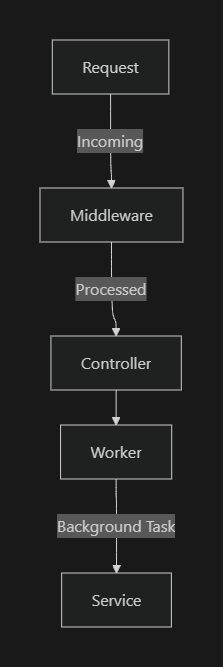
The microservice includes custom middleware for request handling (req.middleware.ts) and workers for background processing tasks (asset-account.worker.ts, customer.worker.ts). These components ensure that tasks such as data processing and logging are handled efficiently in the background.
Middleware and Worker Interaction
Request Middleware
@Injectable()
export class RequestMiddleware implements NestMiddleware {
  use(req: Request, res: Response, next: NextFunction) {
    console.log('Request received:', req.method, req.path);
    next();
  }
}
8. Events and Logging
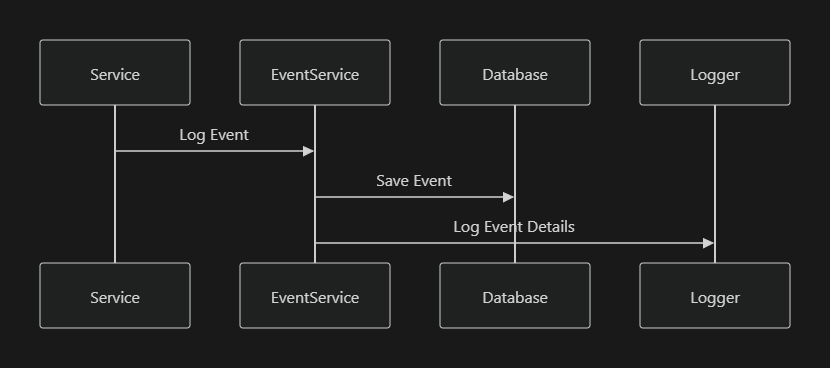
The event.service.ts manages the event system, which records and logs significant actions within the system. This service can be extended to include additional event types and logging mechanisms.
Event Handling Flow
Logging an Event
@Injectable()
export class EventService {
  async logEvent(type: string, payload: any) {
    const event = new Event();
    event.type = type;
    event.payload = JSON.stringify(payload);
    await this.eventRepository.save(event);
    this.logger.log(`Event logged: ${type}`);
  }
}
9. Data Flow
The following diagram illustrates the data flow within the account microservice, including the API Gateway and interaction with the authentication service.

Conclusion
This microservice is a well-architected component of a larger system, designed to handle complex business logic related to asset management, user authentication, messaging, and event logging. The use of NestJS and TypeScript provides a robust framework for building scalable and maintainable microservices, with clear separation of concerns through the use of services, resolvers, middleware, and workers.
What is the Account Microservice?
The Account microservice in our company is a specialized software component designed to manage and handle accounts. It operates on a universal behavior model that represents any kind of account, primarily focusing on the management of account balances which are affected by credit and debit operations.
-Mostly used in the Asset Account and Paying plan in Oves
GOALS AND PURPOSE
- Financial Transaction Management: Manage all financial transactions, maintaining accurate and current account balances.
- Efficient Resource Allocation: Optimize the allocation and usage of financial resources across different accounts.
- Enhanced Reporting: Generate detailed financial reports for analysis and decision-making, aiding in financial planning and auditing.
Key Features
1.Central State - "Balance"
- Each account managed by this service has a central state termed as "balance."
- This balance reflects the current financial standing of the account, taking into account all credits (additions) and debits (subtractions).
2.Credit and Debit Operations
- The service allows for the execution of credit operations, which increase the account balance.
- Similarly, debit operations can be carried out, which decrease the account balance.
Managing Account Balance
- Balance Tracking: The service keeps track of the balance of each account, ensuring that all financial transactions are reflected accurately.
- Credit Operations: Any additions to the account, such as deposits or incoming transfers, are managed as credit operations.
- Debit Operations: Withdrawals or expenditures are handled as debit operations, subtracting from the account balance.
How It Works
- Managing Account Balances:
- The service keeps track of the balance of each account, updating it as transactions occur.
- This involves recording all transactions that either add to (credit) or subtract from (debit) the account balance.
- Transactions Recording:
- Every financial transaction on an account is recorded and reflected in the account balance.
- This helps in maintaining an accurate and up-to-date record of the financial activities associated with each account.
- Consistency and Reliability:
- The service ensures that all transactions are processed reliably and consistently.
- This means that the balance always reflects the true financial state of the account after every operation.
P2C Process
Overview
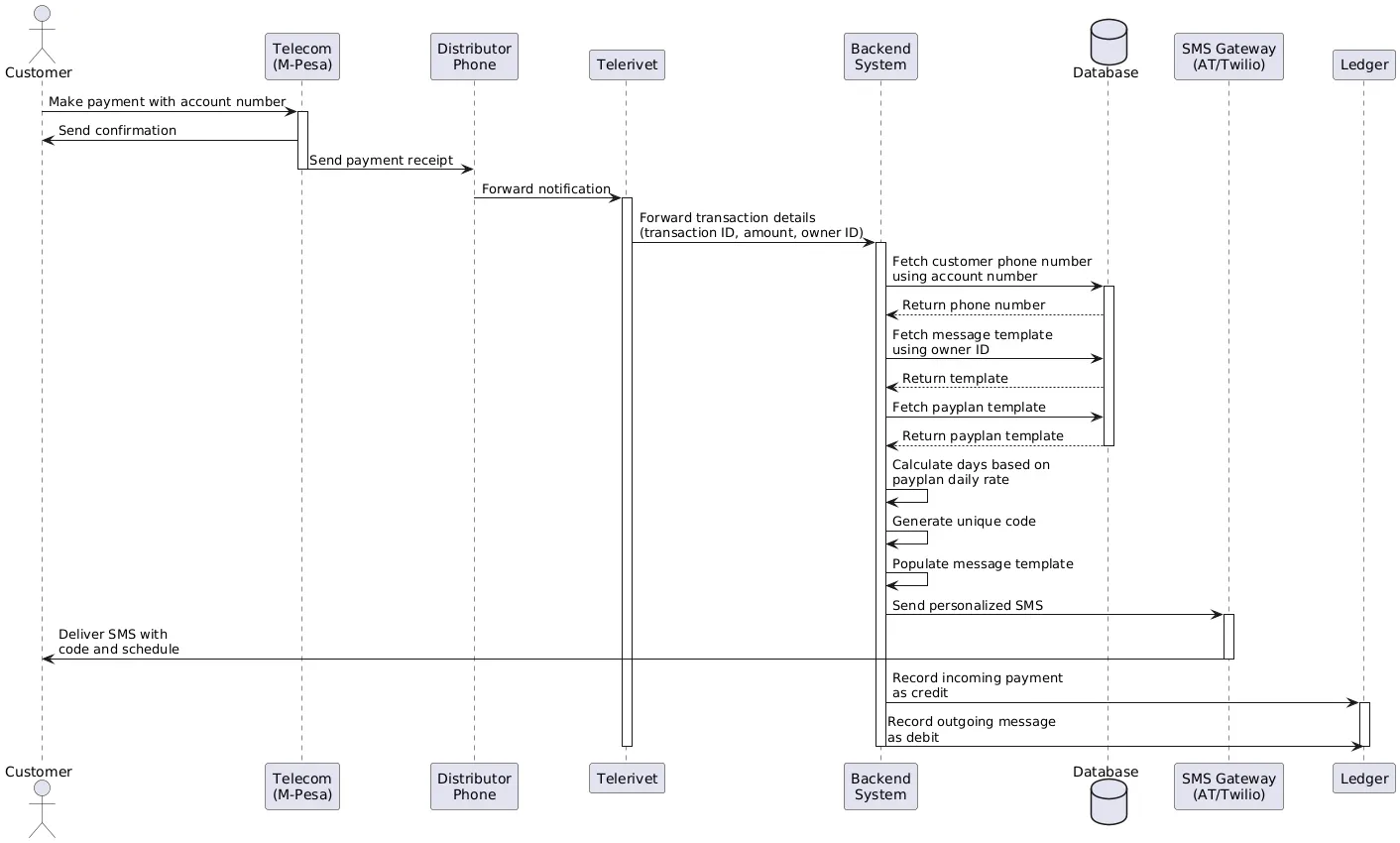
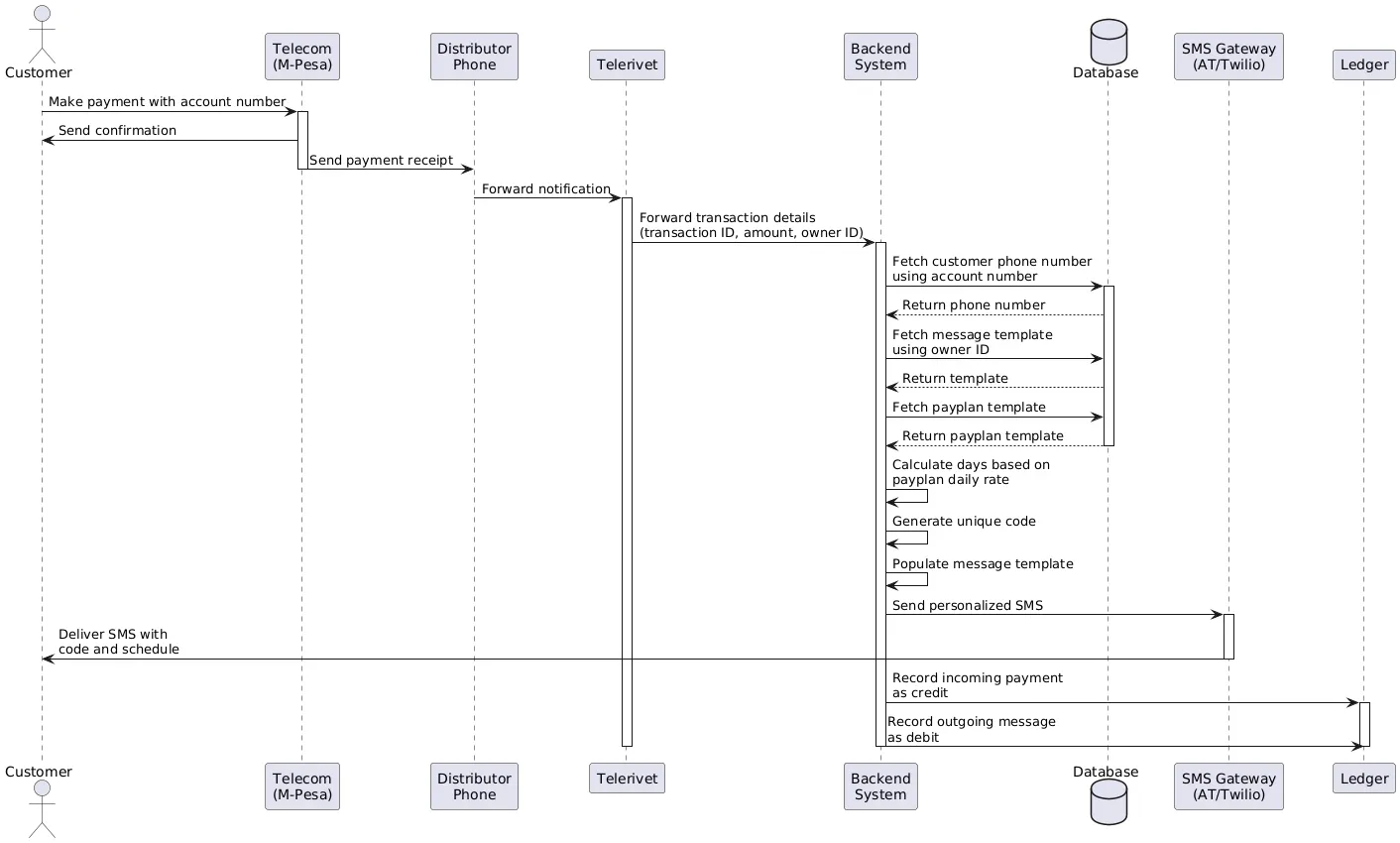
The payment-to-code process integrates three processes
- SMS Gateway
- CodeGeneration process - API
- Notification process
TERMS TO CONSIDER
- Distributor A distributor is a system (oves system) verified account in our application. OVES directly deals with the distributor not the client
- Person/Client This is the end customer who owns the device. Each person has an account on our platform. NOTE: The owner of the IOT device does not necessarily have to be the one to make the payment
- sellerItemId This is a unique id in our application that is assigned to each specific IOT device. It is also used as an account number to facilitate payment
- Mobile Money Platform This is the provider of the payment service. Our systems are designed in such a way that it is data agnostic, meaning it can process data from various sources and in different formats without being
limited to a specific type or structure, essentially meaning it can work with data regardless of its origin or format, allowing for flexibility in data
analysis and integration.
- Telerivet Telerivet acts as an SMS gateway. It is the link between the
distributors and the Manufacturer (OVES) when payment is made, as we don’t directly deal with the client. Payments to the distributor are forwarded as sms notifications to telerivet
ARCHITECUTRAL OVERVIEW OVES
Once the sms notification is forwarded to our api, we have various independent components that interact to keep a record of the payment
- Account Microservice This microservice keeps track of an asset account.
An asset account contains the details of the customer and the asset that is assigned to the customer, so it informs us of who currently owns the device.It contains details such as the person/client, the distributor id, the asset id, the credit activities, the payment plan and details
- Thing Microservice This microservice contains the full details of the
asset/item. So when this process starts the asset id from the asset account will be used to get the details of the asset and also it is important for
codegeneration to attach the codes to the item in this microservice and generate a code history for it.
- Client Microservice This microservice keeps details of the clients and
distributors. We use it in this process to fetch the customer details that are attached to the asset account, to know exactly which distributor the client belongs to.
- Auth Microservice This is important for authentication. The payment
process is a process that need authentication to prevent an insecure access of our payment process as it is coupled with generations of the codes. So only an authorized token can be used to generate codes
For full end-to-end process these three processes have to communicate even in the event of errors. Multiple communication channels are used for redundancy and in the event that one channel is down.
SMS Gateway
What is SMS Gateway?
- An SMS Gateway is a service or software application that enables the sending and receiving of SMS messages between a system (like a web application, database, or CRM) and mobile networks. It acts as an intermediary, translating messages from communication protocols (like HTTP, SMTP, or SMPP) into the format required by the carrier’s SMSC (Short Message Service Center).
As OVES we have chosen the option of telerivet as our SMS GATEWAY. Some of the reasons why telerivet was chosen for this application are:-
How Telerivet Differs from Traditional SMS Gateways
- Local SMS Sending via Android Phones:
- Telerivet: You can use the Telerivet Android app to turn an ordinary phone into an SMS gateway. This is particularly useful in regions where local carriers or regulations make it difficult to send messages using traditional SMS gateways.
- Other Gateways: Typically rely solely on connections to carrier SMSCs
or aggregator APIs, which may not always have competitive pricing or coverage in certain regions.
- User-Friendly Web Interface:
- Telerivet: Offers a no-code/low-code visual interface for creating workflows, automating responses, and managing contact lists. This makes it accessible to non-developers.
- Other Gateways: Tend to focus more on API-based interactions, which are developer-centric and less intuitive for non-technical users.
- Global Reach with Local Optimization:
- Telerivet: Combines the benefits of global SMS sending with local fallback options through the Android app. This is ideal for businesses operating in markets with varying carrier reliability or pricing.
- Other Gateways: Generally rely on partnerships with international
aggregators, which can sometimes result in higher costs or limited reliability in less-developed markets.
- Automation Features:
- Telerivet: Enables you to set up automated workflows (e.g.,
auto-replies, surveys, appointment reminders) directly in the platform, without requiring external systems.
- Other Gateways: Typically require you to build automation using your
software
- Pricing Model:
- Telerivet: Offers flexible pricing, allowing users to choose between using their own phone for local SMS (minimizing costs) or Telerivet’s integrations with aggregators for global reach.
- Other Gateways: Pricing is often tied to per-message costs via
aggregators, which might not always be cost-effective in specific regions.
PAYMENT WORKFLOW

The payment process is initiated by the customer (a). Mobile money solutions are ubiquitous and convenient way for customers to pay businesses and Omnivoltaic leverages various solutions to facilitate the process.
A customer may have a MMP (Mobile Money Platform) on their Android device which they will use to pay the distributor who sold the IOT device (c).
Once the distributor receives the payment notification for a specific account (In this case an account is a unique number attached to each IOT device which the customer will need to pay), it is termed as sellerItemID in our records, then the Short Message Service is sent to telerivet (d).
Telerivet is a cloud sms gateway platform. The requirement here is that a distributor will need a telerivet enabled phone. As earlier mentioned telerivet enables a mobile device to act like an sms gateway that will forward the message to the cloud, given the right credentials. It can intercept messages from the mobile device and send them to telerivet.
We receive the message from telerivet and parse the message for the relevant data that will enable our api services to process the customer details and generate tokens. After parsing of the sms- (this is done to format the data to a predefined schema that our api has specified. And also it prevents having to predict how the message will look like since only the relevant data points that the api needs are carefully extracted), the data is transmitted in the correct format to OVES servers (e).
Oves APIs are used to generate the relevant tokens for the customers in question, then we use telerivet here or any other SMS gateway(f) to send an sms containing the token to the specific customer number.
Once confirmation is successful there is no need for any alternative action
Core Entities
Asset Account
The central entity that connects users, assets, and payment information.
entity-relationships.mermaid
data_objectCode
AssetAccountActivityCreditAccountPaymentPayPlanTemplatePersonItemDistributorAgentPlanDetailcontainshasschedulesusesowned-byreferencesmanaged-byassigned-torecordsowned-bycontains
Account Lifecycle
account-lifecycle.mermaid
data_objectCode
Payment Processing
Credit Account Operations
credit-operations.mermaid
data_objectCode
DatabaseAssetAccountRepositoryAssetAccountServiceGraphQL APIClientDatabaseAssetAccountRepositoryAssetAccountServiceGraphQL APIClientalt[Account Not Found][Account Not Activated][Account Inactive][Success]Request Credit OperationcreditCreditAccount(id, paymentInput)findOne({_id: id})QueryReturn AccountReturn AccountThrow NotFoundExceptionReturn ErrorThrow NotAcceptableExceptionReturn ErrorThrow NotAcceptableExceptionReturn ErrorUpdate BalanceAdd Activity Recordflush()Save ChangesUpdate IndexingReturn Updated AccountReturn Success
Debit Account Operations
debit-operations.mermaid
data_objectCode
DatabaseAssetAccountRepositoryAssetAccountServiceGraphQL APIClientDatabaseAssetAccountRepositoryAssetAccountServiceGraphQL APIClientalt[Account Not Found][Account Not Activated][Account Inactive/Suspended][Success]Request Debit OperationdebitCreditAccount(id, paymentInput)findOne({_id: id})QueryReturn AccountReturn AccountThrow NotFoundExceptionReturn ErrorThrow NotAcceptableExceptionReturn ErrorThrow NotAcceptableExceptionReturn ErrorUpdate BalanceAdd Activity Recordflush()Save ChangesUpdate IndexingReturn Updated AccountReturn Success
Balance Management
balance-management.mermaid
data_objectCode
Pay-to-Code System
Pay-to-Code Process Flow
pay-to-code-flow.mermaid
data_objectCode
Message ServiceCode GeneratorItem ServiceAssetAccount ServicePayToCode ServiceGraphQL APIUserMessage ServiceCode GeneratorItem ServiceAssetAccount ServicePayToCode ServiceGraphQL APIUseralt[Sufficient payment][Insufficient payment]Submit payment (sellerItemId, amount)Process payToCode requestFind asset account by sellerItemIdReturn asset accountGet item detailsReturn item informationCalculate days based on paymentGenerate activation codeReturn code (hex, decimal)Update account balanceRecord payment activityConfirm updateGenerate success messageReturn formatted messageGenerate insufficient funds messageReturn error messageReturn Pay2CodeResponseDisplay code or error message
Code Generation Decision Tree
code-generation-decision.mermaid
data_objectCode
Payment Templates
Payment Template Structure
payment-template-structure.mermaid
data_objectCode
Payment Template Lifecycle
payment-template-lifecycle.mermaid
data_objectCode
Account Status Management
Credit Account Status Transitions
account-status-transitions.mermaid
data_objectCode
API Structure
GraphQL Resolvers
graphql-resolvers.mermaid
data_objectCode
Data Flow
Balance Query Flow
balance-query-flow.mermaid
data_objectCode
DatabaseAssetAccountRepositoryAssetAccountServiceAssetAccountResolverGraphQL APIClientDatabaseAssetAccountRepositoryAssetAccountServiceAssetAccountResolverGraphQL APIClientalt[Account Not Found][Success]Query getSpecificAssetAccountCreditBalancegetSpecificAssetAccountCreditBalance(id)getCreditAccountBalance(id)findOne({_id: id})QueryReturn AccountReturn AccountThrow NotFoundExceptionReturn ErrorReturn ErrorReturn account.credit.balanceReturn BalanceReturn Balance
Asset Account Creation Flow
asset-account-creation.mermaid
data_objectCode
DatabaseAssetAccountRepositoryAssetAccountServiceAssetAccountResolverGraphQL APIClientDatabaseAssetAccountRepositoryAssetAccountServiceAssetAccountResolverGraphQL APIClientMutation createAssetAccountcreateAssetAccount(input)createAssetAccount(input)createAssetAccount(input)Save New AccountConfirm SaveReturn New AccountReturn New AccountReturn New AccountReturn New Account
Security Model
security-model.mermaid
data_objectCode
Detailed Component Documentation
1. Asset Account Entity
Copy
export class AssetAccount extends BaseEntity {
manager: ObjectId; // Distributor managing this
account
agent: ObjectId; // Optional agent assigned to this
account
user: ObjectId; // Person using the asset
credit: CreditAccount; // Credit account for payments
asset: ObjectId; // Reference to the physical asset
paySchedule: Payment[]; // Payment schedule
accountStage: AssetAccountStages; // Current stage in the
account lifecycle
paymentPlan: PayPlanBaseEntity; // Payment plan applied to this
account
meta: AssetAccountMeta[]; // Additional metadata
eventId: string; // Event tracking ID
// Helper method to get specific plan details
getPayPlanDetails(key: string): PlanDetail | undefined;
}
2. Credit Account Entity
Copy
export class CreditAccount {
owner: ObjectId; // Person who owns this credit
account
currency: string; // Currency code (ISO 4217)
balance: number; // Current balance
totalAmountPaid: number; // Total amount paid to date
minBal: number; // Minimum allowed balance
maxBal: number; // Maximum allowed balance
activities: Activity[]; // Transaction history
accountStatus: AccountStatus; // Current account status
}
3. Activity Entity
Copy
export class Activity {
action: AccountActions; // Type of activity (CREDIT,
DEBIT, etc.)
datetime: Date; // When the activity occurred
amount: number; // Amount involved in the activity
notes: string; // Additional notes
transactionId: string; // Unique transaction identifier
senderAccountNumber: string; // Sender's account number
senderAccountName: string; // Sender's name
status: ActivityStatus; // Status of the activity
}
4. Pay2CodeResponse
Copy
export class Pay2CodeResponse {
codeType: string; // Type of code generated
codeHex: string; // Hexadecimal representation of
code
codeDec: string; // Decimal representation of code
totalAmountPaid: number; // Total amount paid to date
message: string; // User-friendly message
customer: object; // Customer information
}
API Reference
Queries
-
getSpecificAssetAccountCreditBalance
- Purpose: Get the current balance of a credit account
- Parameters:
assetAccountId: ID! -
Returns:
Int -
Example:
Copy
query {
getSpecificAssetAccountCreditBalance(assetAccountId:
"60d5ec9af682d123e4567890")
}
-
getSpecificAssetAccount
- Purpose: Get detailed information about an asset account
- Parameters:
id: ID! -
Returns:
AssetAccount -
Example:
Copy
query {
getSpecificAssetAccount(id: "60d5ec9af682d123e4567890") {
_id
accountStage
credit {
balance
currency
activities {
action
amount
datetime
}
}
}
}
-
getAllAssetAccounts
- Purpose: Get a paginated list of asset accounts
- Parameters:
args: ConnectionArgs!, search: String -
Returns:
GetAllAssetAccountsResponse