Welcome to Shadow API
This API is meant to mirror Omnivoltaic OTP API (same requests & expected responses) but source data from the Enterprise Resource Management (ERM) web system.
The Shadow API functions as a proxy server that intelligently redirects users based on their account status when logging in.
It's important to note that all API requests, should maintain the same request body and response structure. However, clients might experience differences in the product ID. In the Legacy system, product IDs are represented as integers, whereas in the ERM system, they are represented as strings.
Requirements
- Distributors should have an account on Enterprise Resource Management (ERM) web application.
- Distributor data must be migrated from the Legacy (B2B) account to ERM.
Usage
To migrate to the new API endpoints, The client must reset their password on the new ERM https://erm.omnivoltaic.com/ and continue using the base URL https://api.omnivoltaic.com/ in their codebase.
Afterward, the client will no longer have access to the b2b legacy system. This ensures a seamless transition to the updated endpoints. All other endpoints have similar names for example login use https://erm-shadow-api.omnivoltaic.com/user/login which is similar to the legacy endpoint https://api.omnivoltaic.com/user/login.
By using the familiar base URL, clients can ensure a smooth transition while taking advantage of the updated functionalities and improved performance.
Upon successful migration and password reset, developers have the option to choose between using the legacy productItemIds (of type Int) or updating them with their respective ERM IDs (of type string) for ongoing API calls. However, we strongly recommend updating the legacy IDs with the ERM IDs, as the ERM IDs will be exclusively used for any new product additions in the future. This ensures consistency and compatibility with our evolving platform.
The ERM IDs can be accessed by logging in to your ERM UI and navigating to the Items page. There, you will find the ERM IDs listed for each item. Additionally, upon migration request from Omnivoltaic, CSV files will be provided containing the legacy productItem IDs alongside their corresponding ERM IDs. These files will serve as a reference for all the migrated assets under a given distributor profile.
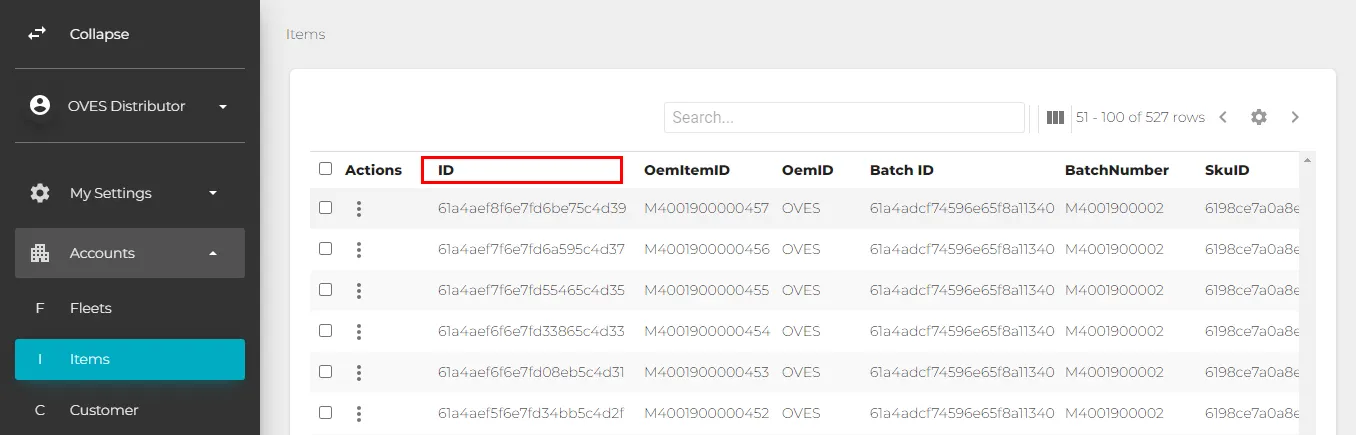
Typical ERM ID
Developers should also expect the same response JSON structure as from the previous API. e.g after logging in send the same payload POST request
{ "username": "", "password": "" }
Expected response
{ "accessToken": "", "user_role": "" }
Note: we have an exception on the response where you would expect string instead of int type. For example, when listing assigned items, you will get the same object JSON but unlike the Legacy API, assignedItemsID, productItemID, and distributorID will be string, not int type.
{ "total": 9,
"results": [
{
"assignedItemsID": "507f1f77bcf86cd799439011",
"productItemID": "61800dc4bf5a3fe75eeb5d37",
"distributorID": "618e2c9434c1b72953dad999",
"itemAssignDate": "2021-11-01T16:00:51.750Z",
....truncated
Token Code Generation Overview
Omnivoltaic device firmware can change operation behavior based the commands it receives. Token code is a specific device control command that changes its allowed time to tun, similar to the credits of coin-operated meters. When a valid token code is entered into a device, it will cause device internal credit count to increase by an amount coded in the token or set it to special states “free” or “reset”.
Token code generation API is designed for 3rd party to generate these codes to control Omnivoltaic device. A common scenario is for product distributors or PAYG SaaS service providers to create tokens that control running credit of an Omnivoltaic device, based on the business rules of their applications. Device token code generator only deals with the actual token generation, agnostic of the value of token credit. The minimum granularity of credit of Omnivoltaic devices is a day or 24 hours. Codes are generated using a unique device identifier, and a code is valid one time only (OTP). Furthermore, codes can only be generated for devices that have been assigned to the API client account.
To be able to access this API, authorization is needed through a registration and approval process. Once authorized an “accessToken” will be provided to access the API. Only authorized users will be able to request and be granted access tokens. Access to different portions of this API is based on account type and granted access level.
This token code API consists of requests for code generation, and access permission token renewals.
Error Codes
Error messages are designed to give perspective application developers some understanding what a call failed or returned unexpected result. The error messages are kept to a minimum in order to avoid confusion, and direct communication to the Omnivoltaic API designers and business coordinators are encouraged in case where the error condition may be subtle.
HTTP standard status code categorization is followed where it makes sense, namely the are divided into the five categories presented here:
- 1xx: Informational - Communicates transfer protocol-level information
- 2xx: Success -Indicates that the client’s request was accepted successfully.
- 3xx: Redirection - Indicates that the client must take some additional action in order to complete their request.
- 4xx: Client Error - This category of error status codes points the finger at clients.
- 5xx: Server Error - The server takes responsibility for these error status codes.
Possible Errors gotten from Code Generation
-
When using this mutation there are some errors codes one might encounter :
-
HTTP status code 400: Comes up when a distributor ties to search for products that are not in their access level.
{
    "error": "Error: Distributor does not own this item."
}
- To resolve it make sure that you have access for the specific distributor account in order to view it’s items and other properties.
- Bad User input :
{
    "error": "Error: Item is not found"
}
- In order to resolve it one needs to make sure that the
productIdis passed and captured correctly.
Global variables in Code Generation
- Frequency Limit : The time lapse between two successful code generation request should be at least 6 seconds.
- Code Limit Count : The product cannot go beyond 1096 days ; beyond 1096 the product will be unlocked.
-
Daily Code Count Limit : This means that not more than 10 codes can be generated per day.
- When more than 10 code are generated in a day, it pops up this error.

-
Credit Stacking Limit : The day code count limit is set according to each specific distributor.
- Each distributor can set and reset their day code count limit according to their preference.
NB
The following end-points have been deprecated and are no longer supported.
- https://{{domain}}/otp/commitOtp
- https://{{domain}}/otp/generateOtp
Use daysCode/freeCode/resetCode instead.
Other Resources
The API utilizes Graphql which developers can use to access more functionalities.